The best projection mapping software in 2026: two lists, because it is two jobs
Most comparisons rank 40 tools as if they competed. They do not. Some play the show, others prepare it, and mixing the two is how projectors end up in the wrong place. I have mapped the Arc de Triomphe 7 times and deployed 250+ media servers. Here is the split that matters.
Try Lumeo free for 30 days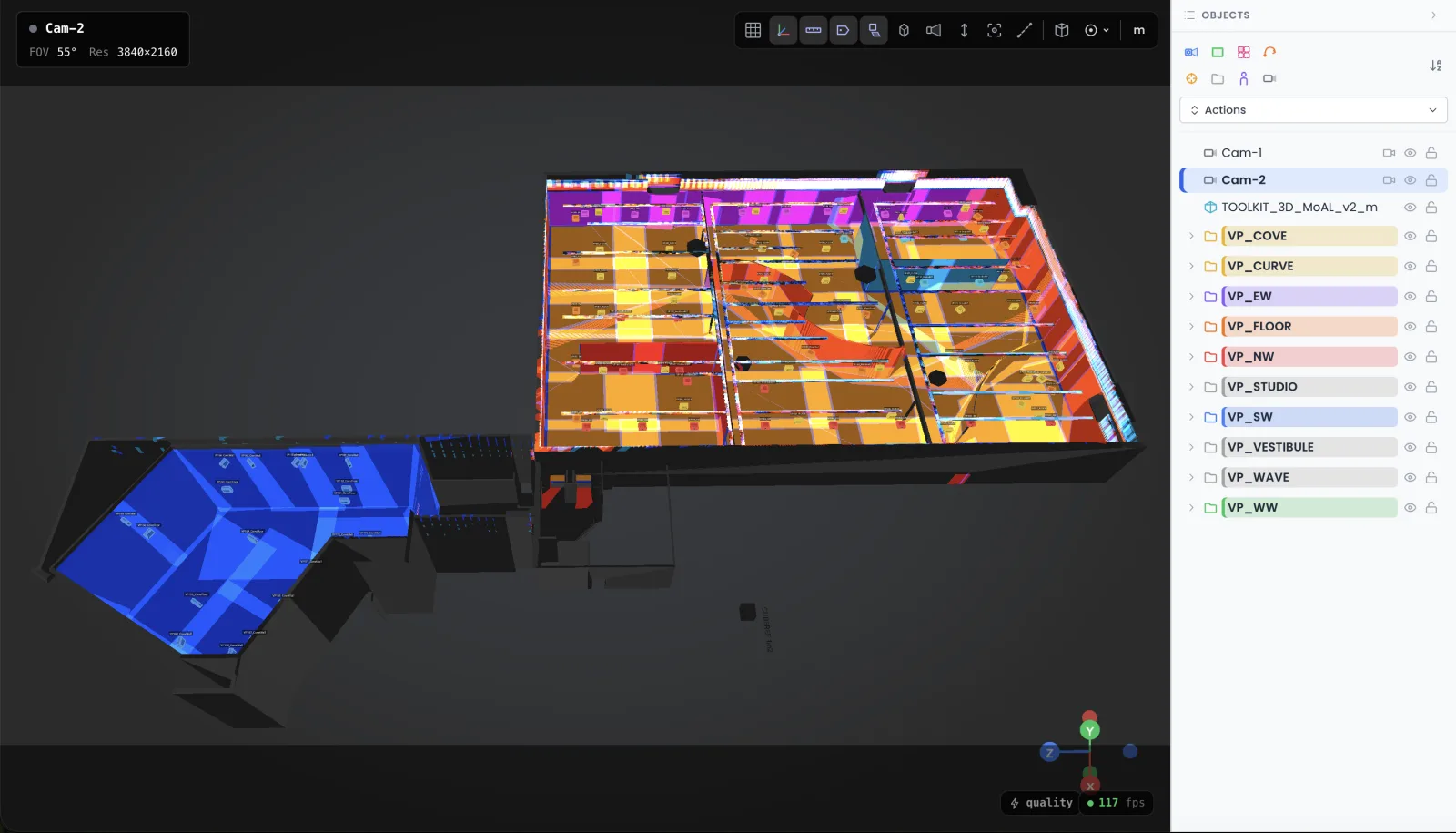
Playback or preparation: the split every listicle skips
Search for the best projection mapping software and you get lists of 30 or 40 names ranked against each other. Read them closely and something is off: half of those tools warp and play content on projectors that are already mounted, and the other half help you decide which projectors to mount in the first place. Ranking one against the other is like ranking the truck against the road map.
Playback software runs the show: warping, edge blending, playing content on real hardware, live. MadMapper, Resolume, HeavyM, and above them the media servers, Modulo Player, Modulo Kinetic, disguise, Watchout. Preparation software works weeks earlier: which projector, which lens, from where, and whether the client gets 80 lux or a washed-out grey. Lumeo, Mapping Matter, Depence, Capture.
Nine installs out of ten that I am called to rescue went wrong at the preparation stage, before anyone opened a mapping app. So this comparison does what the others skip: it separates the two categories and ranks inside each. Full disclosure before you read on: Lumeo is my product and Modulo Pi is the media server I deploy and teach. I will flag both when we get there.
Already sure you need the preparation side? I wrote a dedicated page on 3D projection mapping software that simulates first.
Projection mapping software for preparation: simulate before you rent
These tools output zero pixels on show night. Their job is the study: geometry, photometry, hardware choice, the technical file your rental company quotes from. Skipping this category is the most expensive way to save money in this trade.
1. Lumeo
Best for projection and LED wall studies in a browser
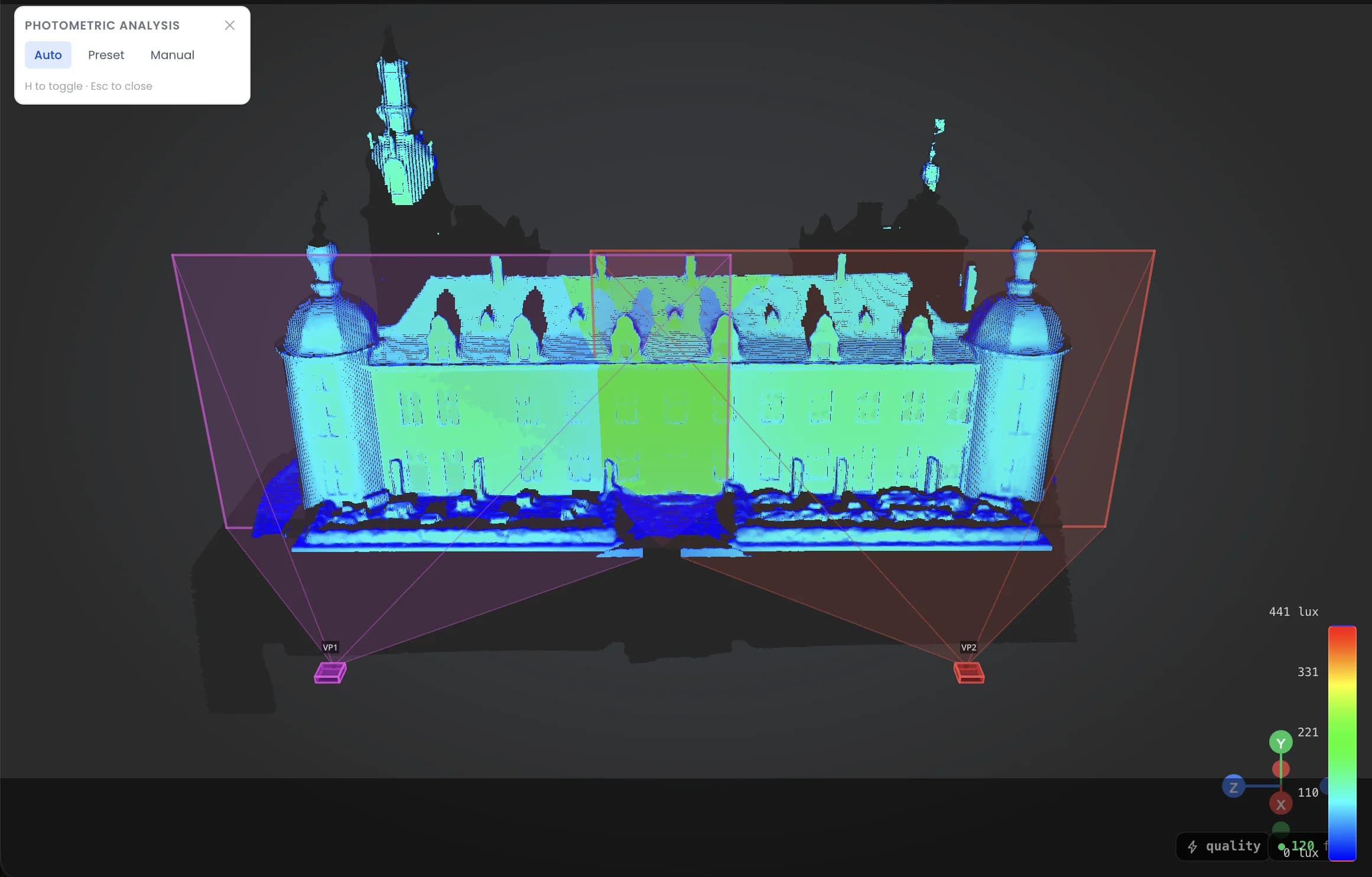
Lumeo is my product, so audit everything I write here. It builds the projection study in a browser tab: you place surfaces and projectors, pick from a database of 293 projector models and 763 lenses with manufacturer values, and read real lux on every surface, blend zones included. POV per projector with lens shift, PDF export with one sheet per machine, and a viewer link the client opens without an account. 50 € per month or 500 € per year, 30-day trial, cancel in one click.
I rank it first in this category because I built it for this exact job, after redoing the same study one time too many. The reference file: the Museum of Art and Light in Kansas, 108 projectors, 3,400 m². Each revision cost me about 3 days with Excel and 3DS Max. Rebuilt in Lumeo, about 3 hours. To be equally clear: it is not the best projection mapping software overall, because nothing is. It prepares the show and plays back exactly nothing.
Read the full MoAL case study, 108 projectors2. Mapping Matter
Best known alternative for projection studies
The closest neighbour to Lumeo, and the only other tool I know that treats the projection study as the whole job rather than a side feature. It also runs in the browser and has been serving projection designers for years. If you are choosing between the two, compare the parts you will use daily: projector database depth, photometry, deliverables. I think Lumeo goes further on that scope, and I am precisely the wrong person to ask, so run both trials on the same venue and let the lux maps argue.
3. Depence (Syncronorm)
Best for render-grade show visualization
Depence simulates the full show, lighting, lasers, water, video and drones, on one timeline, with renders good enough to close a client before a single truck moves. That is a different, bigger job than a projection study, and it comes with different hardware: Windows plus a serious NVIDIA GPU, licensed as perpetual modules on a dongle. For multi-discipline show design it earns its reputation. For placing 12 projectors on a facade, it is a lot of software for the task.
My full Depence R4 review, with prices and dates4. Capture
Best for lighting previz
Lighting previsualization done properly: fixtures, beams through haze, and a live link to a real lighting console. Lighting designers swear by it and they are right to. It treats video projection the way a lighting tool does, as one source among many, not as a photometric study with a BOM at the end. If your show is moving heads first and projection second, start there.
Video mapping software for playback: what actually runs the show
These are the tools everyone means by projection mapping software: they warp, blend and play content on hardware that already exists. Seven names cover almost every real-world case I meet.
5. MadMapper
Best default for most indoor installs
The name everyone says first, for a reason. Projection, LED and laser control in one app, with a workflow you can learn in an afternoon and keep pushing for years. For the majority of indoor installs on simple surfaces, it is the sensible default. (Yes, I use it. No, I am not turning that into a sales argument.)
MadMapper official site6. Resolume Arena
Best for live visuals and VJing
Built by and for people who play visuals live. Mixing, effects, audio reactivity, plus the warping and edge blending to put it all on real surfaces. If your mapping lives in clubs, concerts and events where the content changes with the night, Arena is what the industry actually runs at the booth.
Resolume official site7. HeavyM
Best entry point for beginners
The easiest way in. No code, a large library of generative effects, and a beginner gets something moving on a wall within the hour. It trades depth for speed, which is the right trade for a small event and the wrong one for a cathedral.
8. Modulo Player and Modulo Kinetic
My pick when the show justifies a media server
Here is where I stop pretending to be neutral. My own shows run on Modulo Pi: 250+ servers deployed over the years, and I train teams on it as a certified Modulo Pi trainer. Read this entry as the opinion of someone deep inside the ecosystem.
Modulo Player is the all-in-one media server: playback, warping, blending and show control without extra licenses to make the datasheet true. Modulo Kinetic adds the 3D pipeline, real-time compositing, tracking, and a built-in 3D autocalibration that recalibrates a monumental facade in a time that still feels unfair. The 7 Arc de Triomphe projections I worked on ran on Modulo. It does what it says, and in a live regie that sentence is worth more than any feature list.
The honest counterweight: not everyone needs a 30,000 € Kinetic. For 80% of the simple indoor installs I see, MadMapper or Resolume hold up fine at a fraction of the price. A pro media server is justified when the show demands it, not to look impressive on the quote.
Modulo Pi official site9. disguise
Best for large touring and xR productions
The heavyweight platform for touring shows and xR stages. If your production has an office, a truck count and a broadcast feed, disguise belongs on the shortlist. If it does not, your shortlist is shorter than that, and cheaper.
10. Watchout (Dataton)
Best for multi-display corporate and museum jobs
Dataton's multi-display workhorse, on the market for decades and still specified on big corporate and museum installations because it does not fall over. If Watchout taught the industry anything, it is that stability beats bling.
11. The free tier
Best when the budget is zero
Several free or freemium tools handle warping and playback for small setups, and a couple run straight in the browser. They are real options for a first project, with real limits past a couple of projectors. I keep a tested list rather than repeating it here.
Two deeper dives if you are choosing in this category:
The comparison in one table
Categories first, names second. If a row surprises you, the tool is probably in a different category than you assumed, and that is the point of this page.
| Tool | Category | Best at | Runs on |
|---|---|---|---|
| Lumeo | Preparation | Projection and LED wall studies, real lux | Browser |
| Mapping Matter | Preparation | Projection studies | Browser |
| Depence | Preparation (show previz) | Render-grade show visualization | Windows + NVIDIA GPU |
| Capture | Preparation (lighting) | Lighting previz with console link | Desktop |
| MadMapper | Playback | Projection, LED and laser shows | Desktop |
| Resolume Arena | Playback | Live visuals, VJing, blending | Desktop |
| HeavyM | Playback | Fast no-code mapping | Desktop |
| Modulo Player | Playback (media server) | Reliable all-in-one show playback | Dedicated server |
| Modulo Kinetic | Playback (media server) | 3D mapping, tracking, autocalibration | Dedicated server |
| disguise | Playback (media server) | Large touring and xR stages | Dedicated server |
| Watchout | Playback (media server) | Multi-display productions | Desktop / server |
Qualitative on purpose. Competitor prices and specs move too fast for a static table; where I cite them, they are sourced and dated on the linked pages. Checked July 2026.
The one price I control: Lumeo pricing in fullWhich video mapping software for your situation
Faster than re-reading eleven entries. Find your line, take the pick, argue with me by email if it went wrong.
One-off indoor event, flat or simple surfaces
MadMapper or HeavyM. Rent the projector, keep the weekend.
Club nights, concerts, content that changes live
Resolume Arena. That booth is its natural habitat.
Monument facade, multi-projector blend, an audience and a deadline
A media server. Mine is Modulo Player or Kinetic; disguise and Watchout are the other serious rooms in that house.
The hardware is not rented yet
Preparation first, whatever you play on later. Lumeo or Mapping Matter for projection studies, Capture or Depence if lighting leads.
Budget is exactly zero
Free playback tools plus my free calculators. Spend money when the project earns it.
If your deliverable is a signed study for a client, integrator style, I detailed that workflow on the AV previz software page.
When Lumeo is not the right tool
I put Lumeo first in its category, so here are its borders, drawn by the person who knows them best. Lumeo plays nothing. No warping on show night, no output, no media playback. If you need pixels on a wall tonight, buy playback software from the second list and come back before the next project instead.
If you do one small projection a year on a flat wall, skip the subscription entirely. My free throw ratio calculator and a tape measure will cover it, and they stay free. And if your shows are moving heads and beam looks first, Capture and Depence do that job properly; Lumeo simulates zero fixtures and has no plan to fake it.
Two more honest limits: the app is in English only, and it is built for desktop browsers, not tablets. If either is a dealbreaker on your site workflow, wait.
Direct answers
What is the best software for projection mapping?
Split the question first. For playback, MadMapper, Resolume Arena and HeavyM cover most events, and demanding shows run media servers like Modulo Player, Modulo Kinetic, disguise or Watchout; my own choice is Modulo, after 250+ deployed servers. For preparation, simulating projectors and lux before renting anything, Lumeo and Mapping Matter are the browser-based options. Anyone naming one best tool for both halves is selling that tool.
Can you do projection mapping for free?
On the playback side, yes: several free or freemium tools handle warping and playback for small setups, and some run in the browser. On the preparation side, free means spreadsheets plus manufacturer PDFs, which works and is how I did it for years; it is just slow, and fragile every time the hardware list changes.
Is projection mapping illegal?
The technique is legal. Projecting onto a building without the owner's permission is where it goes wrong: depending on the jurisdiction that can qualify as trespass or unauthorized advertising. Every legitimate project I have worked on, including national monuments, had written authorization long before the first lumen. Get the paper, then argue about lumens.
What is the difference between projection mapping software and a media server?
Mapping software like MadMapper or Resolume runs on a computer you provide. A media server like Modulo Player, disguise or Watchout is a dedicated, calibrated machine sold with its software: synchronization across many outputs, show control and redundancy included. Same category of job, playback, at different scales of ambition and budget.
What software do professionals use for projection mapping?
Depends on the segment. Event and club work runs mostly on MadMapper and Resolume. Monuments, museums and permanent installations run media servers; on my projects that means Modulo Player and Modulo Kinetic. And the professionals you never see on stage, the ones doing the studies, use simulation tools like Lumeo before a single unit is rented.
Do I need preparation software if I already own MadMapper or Resolume?
Owning playback changes nothing about the study. If your installs are small and repeat the same room, a calculator is enough. The day a quote reaches five figures or a client must sign off on coverage before the rental, simulation pays for itself: one mis-specified projector usually costs more than a year of Lumeo.
Settle the preparation half before you argue about players
30 days to test Lumeo on a real project: your venue, your lux target, your deadline. If it does not save you one bad hardware decision, cancel in one click and keep the exports.
Start the 30-day trialNot ready to sign up? Open the live demo first
MadMapper, Resolume, HeavyM, Mapping Matter, Depence, Capture, disguise, Watchout, Modulo Player and Modulo Kinetic are trademarks of their respective owners. Baptiste Jazé is a certified Modulo Pi trainer; beyond that, this site is not affiliated with, endorsed by or sponsored by any editor mentioned here. Product information reflects publicly available sources as of July 7, 2026.
Cookies and privacy Learn more
Cookies and privacy
This site uses cookies to measure audience and improve your experience. You can accept, reject or customize your preferences at any time. Learn more