108 projectors, one museum, and a 3-day study brought down to 3 hours
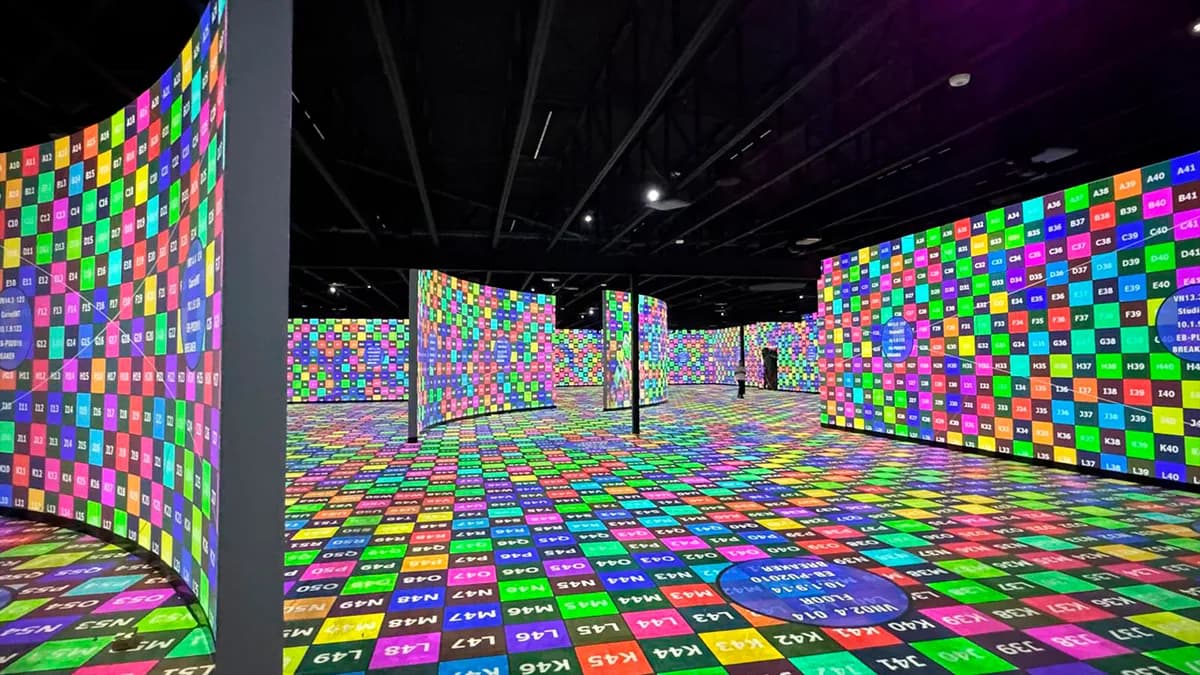
The Museum of Art & Light in Manhattan, Kansas is 3,400 m² of permanent projection. I did the study with Excel and 3DS Max. Here is the same job, replayed in Lumeo.

The project
The Museum of Art & Light is an immersive art museum open 6 days a week. 108 projectors cover walls, floors and ceilings, driven by 26 Modulo Kinetic servers. 188 million pixels running in a loop, all year long. A world first at this scale for a permanent museum, awarded at the WXO World Experience Awards 2025.
I worked on this installation: study, deployment, calibration. With the stack everyone uses, Excel for the inventory, 3DS Max for the 3D scene, manufacturer PDFs for the photometry. It worked. And this is precisely the job that made me decide to build Lumeo.
What costs 3 days per revision
On a permanent installation this size, the photometric study is not a document you produce once. It gets replayed every time the hardware changes. Three things make it painful with the classic stack.
1. The inventory
108 projectors, 6 different models, 12 lenses. Each with its throw ratio and its manufacturer photometric sheet. Excel keeps count, but every model change triggers a cascade of copy-paste.
2. Lux validation
The target is 70 to 100 average lux on the walls, the same on the floor, with no sharp drop in the blend zones. By hand, that is one spreadsheet per zone. The slightest model swap invalidates everything.
3. The replacement file
When a model leaves the catalog, you have to reproduce one sheet per projector: image size, pixel pitch, lens shift, incidence zone. Plus the BOM for the order, plus the sizing note for the hardware financing.
On the real project, this cycle took me about 3 full days per revision.
The same job in Lumeo
Here is how I tackle the same file today, in a Chrome tab.
- 1
Rebuild the 3D scene
I import a simplified GLB of the building, or lay out the main surfaces by hand with the plane, cube and curve tools. For MoAL, a dozen major surfaces are enough.
- 2
Place the 108 projectors
The database ships 293 projectors and 763 lenses with manufacturer values. I pick the model and the lens, throw ratio and image size snap into place. The ring and symmetry cloners handle the repetitive zones in a few clicks.
- 3
Validate lux live
Photometric heatmap on every surface. Under-lit zones show up immediately. I move a projector, the map recalculates. I swap a model, I revalidate. No Excel table to rebuild.
- 4
Export the file
PDF with the global plan and detailed sheets per projector. Excel BOM for the order. And the 3D scene shared through a secure link: the museum team navigates it from a browser, no account, no install.
The delivered file
Global photometric plan. Full lux map exported to PDF, metric scale, legend.
Projector sheets. 108 sheets generated automatically, one per projector: position, model, lens, image size, pixel pitch, lens shift, target distance.
BOM. Excel table per model and per lens reference: quantities, max and cumulative average power draw, total weight.
Client sharing. Secure web link to the 3D scene. The museum's project manager checks the placements himself, without rounds of PDFs.
The time saved, line by line
| Task | Excel + 3DS Max stack | With Lumeo |
|---|---|---|
| Placing the 108 projectors and validating models | 6 hours | 1.5 hours |
| Photometric validation zone by zone | 8 hours | 1 hour |
| Producing the file (plan, sheets, BOM) | 8 hours | 30 minutes |
| Client coordination | 4 hours of successive PDFs | Live 3D sharing |
| Full revision cycle | ~3 days | ~3 hours |
Estimates based on my own experience of the project with the classic stack, against the equivalent Lumeo workflow on the same geometry. Exact figures depend on how familiar you are with the tool.
Why it matters on a permanent installation
An immersive museum does not freeze after opening day. Hardware turns over in 3 to 4 year cycles, content changes, zones get reprogrammed. The hidden cost of a heavy stack is the brake on iteration: nobody replays a photometric study when it costs 3 days of work, so the imbalance is left to live on.
With a tool that replays the study in a few hours, you iterate. You test a new model before signing the purchase order. You rebalance the lux after a floor renovation. That is Lumeo's real job on this kind of project.
What Lumeo does not do here
Lumeo stops where the media server starts. Warping, blending and on-site calibration stay on the Modulo Kinetic side. Content creation too. Lumeo produces the upstream technical file, nothing else.
And if your project is 2 projectors on a facade once a year, you do not need a subscription. My free calculators are more than enough.
See the free calculatorsTry Lumeo on your next file
30-day trial, then 50€ per month or 500€ per year. No machine license, no plugin. In Chrome.
Try Lumeo free for 30 daysCookies and privacy Learn more
Cookies and privacy
This site uses cookies to measure audience and improve your experience. You can accept, reject or customize your preferences at any time. Learn more