Projector color calibration: matching a fleet, not one screen
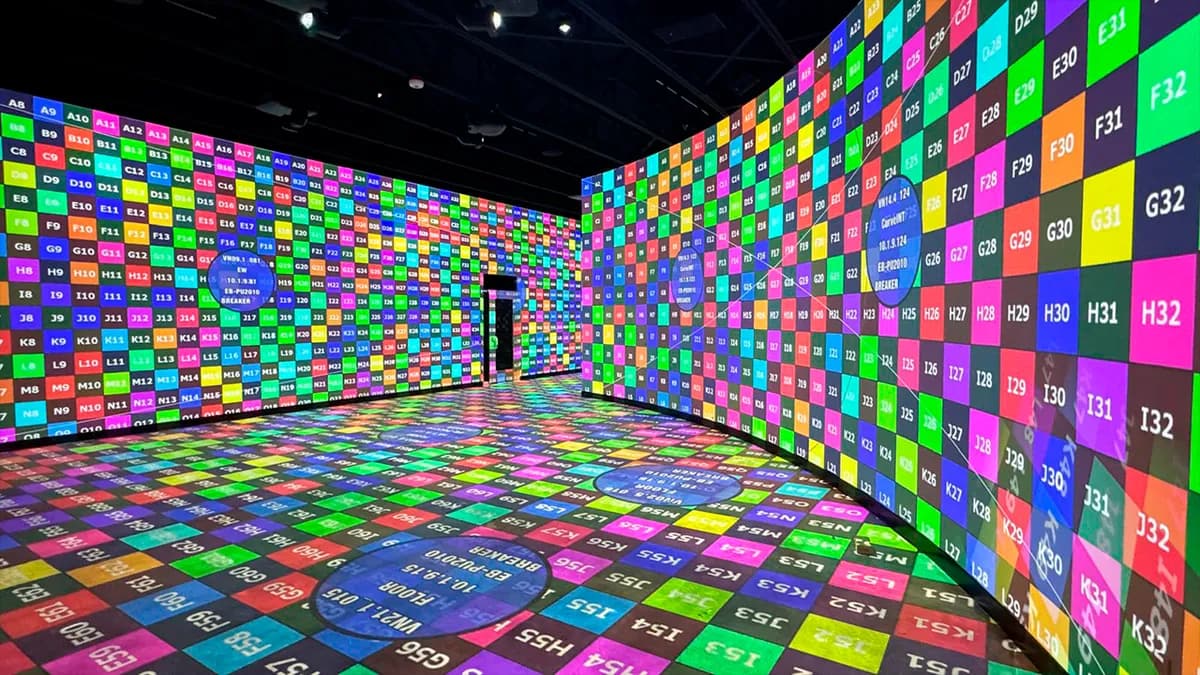
Buy two projectors of the same model, same batch, unbox them the same afternoon. Put them side by side on a white wall, identical settings, full white field. They will not match. One leans a little warm, the other a little green. The eye that forgives either one on its own catches the difference the second they touch. Closing that gap is what projector color calibration is for.
This is the professional version of the problem, and it is not the one most guides cover. Home cinema color calibration means one projector, one screen, one target standard like Rec.709, measured with a colorimeter until skin tones look right. Useful, well documented elsewhere. This page is about the harder job: making a fleet of projectors agree with each other across a mapped surface, a museum, a monument, a permanent venue. I ran the technical study for the Museum of Art and Light in Kansas: 104 Epson projectors and 28 Modulo media servers on 3,400 m². Matching color across that many machines is not a menu. It is an order of operations, and the eye is the last judge, not the first.
Same model does not mean same output. Four things push identical units apart:
The consequence for anyone doing multi-projector work: absolute accuracy is the wrong first goal. The audience never sees your projector against a reference chart. They see it against the projector next to it.
The priority most home cinema guides get backwards: before aiming for an absolute white point, make the projectors match each other. The eye forgives a slightly warm room. It never forgives two different whites in the same image, especially where they overlap.
The working order I use:
Relative before absolute. On the Culturespaces venues, a single unit drifting off the group is visible immediately; a whole fleet sitting 200 K away from Rec.709 but coherent is invisible. Guess which one gets the complaint call.
White balance is where you make the whites agree. Two controls do the work:
Where you do this matters. Most professional projectors expose RGB gain, offset and gamma in firmware. Media servers add a second layer: Modulo Player and Modulo Kinetic carry per-output color correction, so does MadMapper and Resolume for smaller rigs. My rule across 250+ Modulo servers deployed: correct in the projector for the coarse fleet match, then use the server layer for the fine per-output trim during the show. Correcting only in the server means a swapped projector arrives uncorrected and the show notices.
Here is the honest split, because both camps oversell their side.
Your eye is the final judge, and it lies. It adapts. Stare at a warm white for two minutes and it becomes neutral to you, while the probe two meters away still reads 5,800 K. So the eye decides whether the result looks right in the room, with the content, at show state. It does not decide the numbers.
The colorimeter gives you the numbers, and it is cheap insurance. A display colorimeter like the Calibrite range reads the light off the surface and tells you where you actually are versus a target, in kelvin and in Delta E (the CIE metric for how far a measured color sits from the reference). For matching a fleet, you do not even need lab-grade accuracy, you need repeatability: the same probe reading every projector the same way, so a 200 K spread between units becomes a number instead of an argument.
What I carry: one colorimeter, a laptop with test patterns, and the discipline to measure at operating temperature. What I would skip: any "auto color match" that you cannot inspect, export and reload. If the tool cannot tell you what it changed, it will change it again when you are not watching.
For the projected targets themselves, uniform full-field colors and gray ramps are worth more than any content. My free test pattern generator exports uniform white, RGB and gray-scale fields at your exact output resolution, which is the whole point: a 1080p color field scaled onto a 4K output will lie to you about uniformity. More on why in the test patterns guide.
Most of the hard color work I do is on mixed parks. The Culturespaces immersive venues run 60 to 150 projectors per site, and across seven sites the fleet is not one clean generation. New units get added, dead ones get swapped, lamp and laser hours vary wildly across the room. That is the real job: not calibrating a matched set, but pulling a heterogeneous crowd into visual agreement.
What changes at that scale:
Color is not set-and-forget on a permanent install. Lamps age, lasers drift, and a fleet that matched in January pulls apart by June. My cadence:
A camera-based system can measure the fleet faster than a human with a single probe, and on large parks it earns its keep. It still does not decide when the result looks right. That is the eye, at show state, with the house in its real light.
Being honest about scope saves everyone a night:
Where it pays for itself: any blend, any mixed-age fleet, any surface a client will study up close. That is most of what I get called for.
Color is one step of a longer method. It sits after placement, optics, warping and blending, and it fails if any of those are wrong: you cannot match color across misaligned images. The full sequence is in the projector calibration guide, and the failure modes, including "matched by eye at 3 a.m.", are collected in 12 calibration mistakes that ruin video mapping projects. For the fleet-scale picture, see multi-projector setup.
If your whites are fighting each other on a real install and a second opinion would settle it, write to me. Matching two stubborn projectors is faster with someone who has matched 104 in one building.
Cookies and privacy Learn more
This site uses cookies to measure audience and improve your experience. You can accept, reject or customize your preferences at any time. Learn more