Projector calibration software: what the pros actually use
Search "projector calibration software" and you get two piles of results that have nothing to do with each other. One pile is home cinema: a JVC or Sony utility that pairs your projector with a colorimeter to fix its color. The other is a sewing app that lines a projector up with a paper pattern. Neither is what a mapping technician means by calibration software.
On a professional install, calibration software is whatever tool warps, blends, aligns and color-matches several projectors into one image. It is rarely a single program. It is usually a stack: the media server that runs the show, sometimes a dedicated camera-based tool on top, and the projector's own firmware underneath. I have calibrated installs from a two-projector meeting room to 108 projectors at the Museum of Art and Light in Kansas, and the software choice changed at every scale. This page sorts the field by family, and tells you which one you actually need.
If you want the full method rather than the tool list, start from the projector calibration guide. This page zooms into the software layer of it.
There is no single "best projector calibration software", and anyone who ranks them in one list has never had to blend a dome. The tools split into four families, and most real projects use two of them together:
Color calibration (colorimeter software) is a fifth, narrower branch. I cover it at the end because on multi-projector work it matters less than people from the home cinema world assume.
This is the default answer on the large majority of shows. If a media server plays your content, calibrate inside it. One system, one file, one source of truth, adjustable live during the show.
The honest limit of media server calibration: it lives on the show machine. Great for control, less great if you want to align the projectors once and forget the server. That is where the next family comes in.
Standalone tools whose entire job is geometry and blending, usually camera-assisted, output to the projectors or the server independently of the content pipeline.
These tools shine when geometry is the whole problem: many projectors, curved or irregular surfaces, and a need to recalibrate fast when something moves. On a flat wall with two machines, they are a solution looking for a problem.
Every professional projector ships with its own warp and blend engine, configured either from the on-screen menu or a free PC utility from the manufacturer:
The trade-off is real. Firmware curves are cruder than a media server's, black level compensation is often basic, and configuring twelve projectors through menus is a way to lose an evening. For a permanent row of two or three projectors on a flat surface, firmware alone is the right call. Beyond that, you want a server or a camera tool doing the heavy lifting, with firmware holding the mechanical warp underneath. Barco Pulse units, for example, accept an externally computed warp and blend map, so the two layers cooperate instead of fighting.
The step-change of the last decade, and increasingly a feature inside families 1 and 2 rather than a separate purchase. A camera films structured patterns, the software reconstructs the geometry and computes warp and blend automatically.
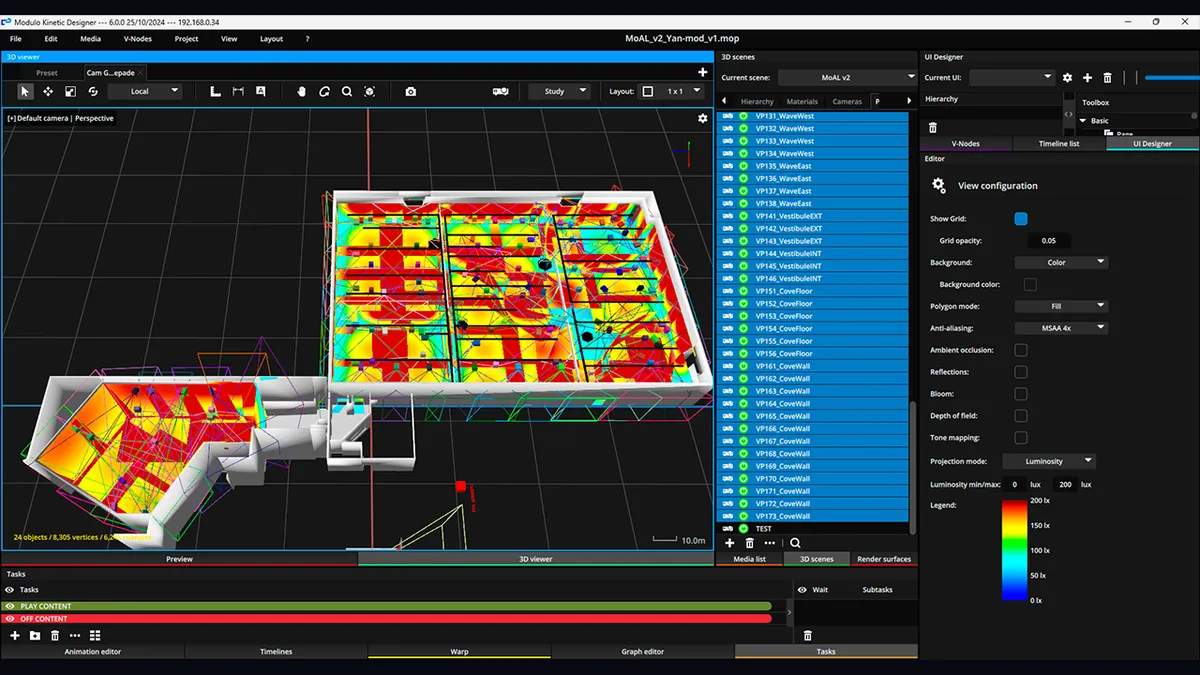
On smooth surfaces, flat walls, curves, domes, single-camera 2D autocalibration takes me under 15 minutes end to end. A dome that would eat a full evening of manual mesh-pushing is done before the coffee is cold. For sculpted 3D geometry, multi-camera systems reconstruct surfaces no manual workflow handles in reasonable time. Modulo Pi builds this into Kinetic, shown at ISE 2025; VIOSO and Christie Mystique do their own version of it.
What autocalibration does not do: fix a badly placed projector. It computes a beautiful warp for a machine that is in the wrong spot, and now you have excellent geometry on a bad idea. It needs clean camera sightlines, controlled ambient light during capture, and a surface the camera can actually see. There are setups where it works brilliantly and setups where it fails politely. Deeper on this in the projector alignment guide.
The home cinema world calls this "calibration software" full stop: CalMAN, JVC's utility, Datacolor SpyderX and their probes, all built to push one projector toward an absolute color standard. Useful, but on a multi-projector install it answers the wrong question first. Before an absolute standard, you need the projectors to match each other. The eye forgives a slightly warm white. It never forgives two different whites side by side.
So on a fleet I match brightness and white point across units by eye and pattern first, and reach for a colorimeter only when the project is genuinely color-critical, or when a permanent install has drifted over months. A single probe for the whole fleet beats one per projector: consistency comes from measuring everything against the same reference.
The decision is mostly about scale and surface, not budget:
Size the overlaps before any of this with the edge blending overlap math, and generate the grids and ramps your calibration software will lean on with the free test pattern generator. The software aligns the image; the patterns are what let you see whether it worked.
Being honest about scope saves money:
The classic errors around all of this, keystone instead of moving the projector, blends decided after placement, color matched by eye at 3 a.m., are collected in 12 calibration mistakes that ruin video mapping projects.
One more thing, and it is a different tool for a different moment: calibration software aligns the projectors once they are hung. It does nothing for the decision that comes before, which optic, how many machines, how many lumens on the surface. I built Lumeo to answer that in a browser, so you show up on site with the layout already validated and spend your calibration time calibrating, not improvising. Preparation and calibration are two jobs. Do the first one right and the second one gets short.
And if you are staring at a fleet of projectors and a piece of software you do not fully trust, write to me. Reviewing a calibration setup takes me less time than your third night fighting it.
Cookies and privacy Learn more
This site uses cookies to measure audience and improve your experience. You can accept, reject or customize your preferences at any time. Learn more