LED Video Wall Guide: Specs, Setup & When to Use

LED Video Wall: The Complete Technical Guide
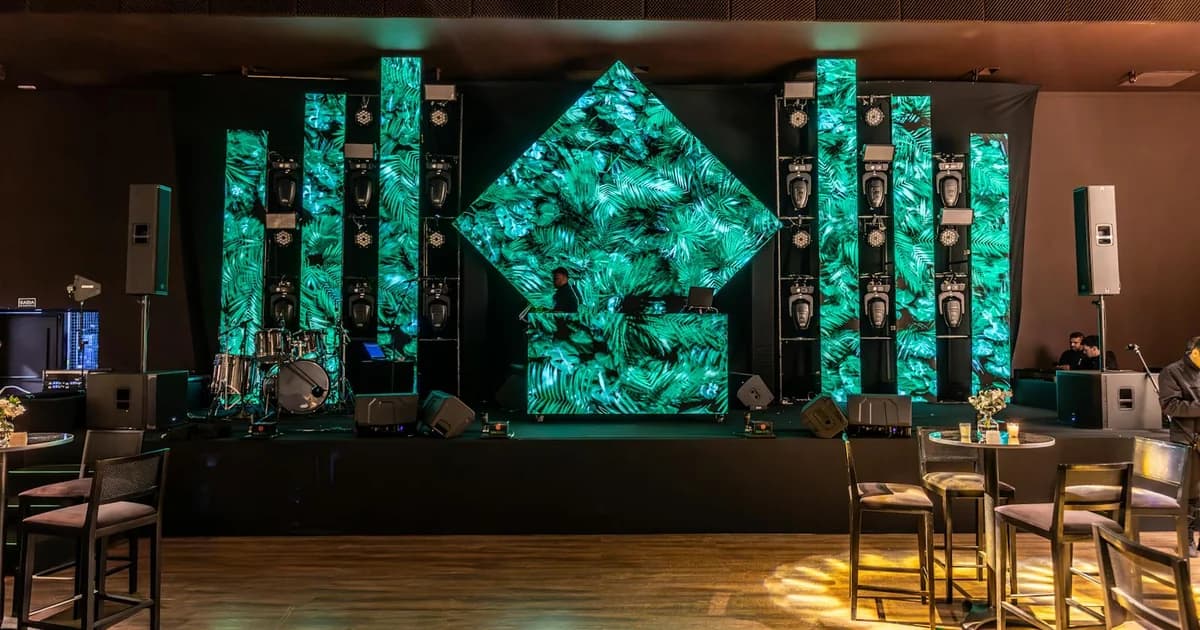
In short. An LED video wall is an assembly of modular emissive panels driven by a processor. Unlike projection, LED produces its own light and does not suffer from the room's ambient light. Pixel pitch decides everything: it depends on viewing distance and it drives the budget. Panels lay out in signal lines and power lines. The item people undersize most is the power supply: planning for 20 to 30 percent of headroom is not a luxury. The processor maps the signal onto the panels. LED beats projection on three precise criteria, and projection still wins in several cases. This guide covers the technical side end to end, and sends the rent-or-buy decision to a dedicated article.
An LED video wall is an assembly of modular emissive panels driven by a processor. Each panel carries a grid of LEDs, the whole thing forms a single image surface. The fundamental difference with a projection screen comes down to one word: LED produces its own light. A projection is reflected, it depends on the surface and the ambient light. An LED wall does not suffer from the room's ambient light. That is what lets it hold up in broad daylight.
This guide covers the technical side end to end: pixel pitch, panel layout, power, the processor. The rent-or-buy question has its own article, I will not go into detail on it here.
(Quick aside: search "LED wall" online and you harvest as many TikTok decor tutorials for lighting a bedroom as pro specs. This guide is about modular panels for events and AV installs, not LED strip behind a headboard.)
LED Wall, LED Screen, LED Panel: the Vocabulary Set Straight
The vocabulary drifts, and that creates confusion on quotes. Let us set it straight.
LED wall, LED video wall, LED screen point to the same thing in both search and trade use: a display surface made of panels. The panel is the unit module you assemble. A 6-metre-wide LED wall is not a single object, it is a number of panels set side by side.
Three elements make a working LED wall: the panels, the processor, the power supply. Remove one and you have nothing. Panels without a processor are dead plates. A processor without a correctly sized power supply makes the wall flicker. The rest of this guide details all three.
Pixel Pitch: the Spec That Decides Everything
Pixel pitch is the first thing to lock down on an LED wall project. Everything else follows from it, the budget first.
Pixel Pitch and Viewing Distance: the Calculation Rule
Pixel pitch is the distance between two neighbouring LEDs, measured in millimetres. A P2.9 has 2.9 mm between each point. A P1.5, 1.5 mm. The smaller the number, the denser the image, and the more expensive the square metre.
The field rule for choosing: the minimum viewing distance in metres roughly matches the pixel pitch number. A P3 looks clean from about 3 metres out. A P1.5 holds up from 1.5 metres. Below that distance, the eye picks out the points and the image pixelates.
This is not a physical law down to the millimetre, it is a starting point. The real question is never "what is the best pixel pitch," it is "at what distance will the audience look at the wall." The relationship between point density and perception is the same concept as on a projected surface: see the relationship between resolution and pixel size.
Indoor, Outdoor, and the Pixel Density You Actually Need
An indoor LED wall and an outdoor LED wall are not chosen the same way.
Indoors, the audience is often close, sometimes a metre or two from the back of a booth. You need a fine pitch, P2.9, P1.9, even tighter for a presentation screen viewed up close. The required brightness is moderate, since the ambient light is controlled.
Outdoors, the audience is further away and daylight demands much higher brightness. The pitch can be wider, P4, P6 and beyond, because the viewing distance allows it and outdoor panels are built for large format viewed from a distance.
The classic mistake: ordering a very fine pitch "for the quality" on a wall viewed from far away. At 15 metres, nobody can tell a P1.5 from a P4. You pay several times the price per square metre for pixels nobody resolves. Choosing pitch by viewing distance is the first place to save money on an LED wall quote.
Panel Layout: Thinking in Lines
An LED wall does not assemble the way you would lay tile. It is thought through in lines, because signal and power both flow in lines.
Total Resolution = Panels × Resolution per Panel
The resolution of an LED wall is simple to work out. Each panel has a unit resolution, for example 168 × 168 pixels. The total resolution of the wall is the number of panels across multiplied by the unit resolution, same for height.
Direct consequence: an LED wall almost always has an odd resolution, neither 1080p nor 4K. It is an assembly, not a standard video format. Someone has to fit the content to the wall's real resolution. If that is not planned on the quote, it will land as an extra, or produce a stretched image on the day.
One Signal Line, One Power Line: the Cabling Logic
Panels chain together. The signal enters the first panel of a column or a row, crosses it, and passes to the next. That is a signal line. Power follows the same logic: a line of panels shares one power chain.
This layout, or pose plan, is not just about looks. It decides the number of ports needed on the processor, the cable length, and the failure points. A signal line too long, and the last panel drops out. A power line too loaded, and the row flickers on a full white. Thinking the cabling in lines from the plan stage avoids both failures.
Power: the Item People Undersize
Here is my blunt opinion on LED walls: the item people undersize most is the power supply. An LED wall quote with no "power headroom" line is a quote to question.
Calculate the Load, Plan the Headroom
Every panel draws power. The consumption shown on the manufacturer's sheet is an average draw, not a peak draw. When the content goes to full white, every LED lights up at maximum, and consumption climbs toward its ceiling.
That is where the trap sits. A wall sized on average consumption holds up on dark content and flickers as soon as the image turns bright. The rule: plan for 20 to 30 percent of power headroom above the calculated peak load. That is not a luxury, it is what stops the wall from faltering at the worst moment, the one where the content is most demanding.
Power Distribution and Failure Points
Beyond the load calculation, power has to be distributed. The larger the surface, the more electrical lines you need, and the venue's installation does not always follow. Running lines, balancing load, sometimes a generator for an event.
Each power line is also a failure point. A line that trips means a section of wall goes dark. Documenting the distribution diagram, planning per-line protection, and keeping headroom: that costs nothing in method, and it avoids the live failure.
The LED Processor: the Brain of the Wall
The LED processor is the least visible item on the quote and the most decisive one for the image.
What the Processor Does (Scaling, Mapping, Colour)
The processor receives the video signal and prepares it for the panels. Three main tasks:
- Scaling. The incoming signal, often in Full HD or 4K, is scaled to the wall's real resolution, which is almost never a standard format.
- Mapping. The processor cuts up the image and sends each panel the exact portion it should display, according to the pose plan.
- Colour and refresh. It handles colour balance, brightness, and refresh rate, which matters a lot as soon as a camera films the wall.
Without a properly tuned processor, the panels display a wrong signal or nothing at all. Processor tuning time is a quote line in its own right, not a ten-minute formality.
Processor vs Media Server: Who Does What
A frequent confusion on projects. The LED processor and the media server do not do the same job.
The processor takes a signal and sends it correctly to the panels. It does not create content, it does not run a timeline, it does not sync several sources. The media server plays the content, handles playback, sync, sometimes interactivity, and sends a clean signal to the processor. On a simple install, a player can be enough ahead of the processor. On a complex show with several surfaces and sync, you need a media server. To make the right call, see how to choose a media server.
Event LED Wall vs Permanent Install
An LED wall is not designed the same way depending on whether it lives two days or ten years.
Events: Load-in, Load-out, Day-of Reliability
For events, the LED wall is rigged, run, and struck in a short window. The modularity of the panels is an asset: you assemble the surface you want, strike it, transport it in flight cases.
The priority is day-of reliability. A panel that drops out mid-show leaves a black rectangle in the middle of the image. Without a spare panel on site, that hole stays there until the end. The build, the processor tuning and the uniformity check take hours: counting them into the schedule avoids the rush.
Permanent: Leasing, Maintenance, Panel Replacement
In a permanent install, the LED wall runs continuously, sometimes 24/7. The hardware often goes on a lease rather than an outright purchase: you spread the spend over three or four years, and at the end of the contract you replace the panels. That is not an accounting detail. An LED panel ages, its brightness drops, its colour drifts. A five-year-old wall does not render like a new one.
This is where the quality of the install gets measured, and it is not measured on delivery day. It is measured by the number of maintenance calls. A well-integrated LED wall, power correctly sized, spare panels documented, processor configured and backed up, runs for years without intervention. A wall installed roughly throws a panel fault every quarter. I have seen both. The difference plays out upstream, not in after-sales. The Museum of Art+Light is an example of a monumental permanent install where the upstream technical study conditions the entire stability of the operation.

LED Wall or Projection: When to Choose LED
LED does not win everywhere. It wins on three precise criteria.
Broad daylight and strong ambient light. LED is emissive, it does not suffer from the room's light. Where a projection gets crushed, the LED wall stays readable. That is its number one argument.
Contrast and very bright content. An LED wall displays deep blacks and clean whites even in a lit environment. Very bright graphic content, saturated colours, render better on LED.
A flat, structured surface. When the brief sits on a straight, square wall, LED is direct to implement.
For the item-by-item comparison, I will not redo it here: see our LED vs projection comparison.
Renting or Buying an LED Wall
The rent-or-buy decision turns on a single number: the days of use per year. Below a threshold, you rent. Above it, you finance. A wall that serves one-off events stays a rental, a wall running in a permanent install gets financed by purchase or leasing.
The full decision math, with the hidden costs and the tipping point, is the subject of a whole article: see renting or buying an LED wall, the decision guide. I will not go into detail here, that is the subject of the other guide.
When an LED Wall Is Not Worth It
The LED wall is not the answer to everything. Here are the cases where I advise looking elsewhere.
A non-flat or sculpted surface. LED panels are rigid. The client who asks for an LED wall curved around a round column finds out fast that the panel does not bend. For a sculpted facade, a volume, an organic geometry, mapped projection follows the real shape. LED does not.
An indoor budget in controlled light. If you control the room's light, LED's number one argument is useless. A well-sized projection renders very well in the dark, often for a third of the price of an equivalent LED wall.
Content not built for the pitch density. A fine wall does not create quality, it reveals the content's. A low-resolution video on a P1.5 stays blurry, only more expensive.
A venue with no rigging access or sufficient power. No structure to hang from, no clearance, a venue power supply that cannot keep up: the LED wall becomes a structural and electrical headache before it is an image. Sometimes the right answer is not to do an LED wall at all.
Direct Answers
What is an LED wall? It is a display surface made of modular panels covered in LEDs, assembled to form a large screen. Unlike a projection, the LED wall is emissive: it produces its own light instead of reflecting a projector's. That is what makes it readable in broad daylight.
How does an LED wall work? Three elements. The panels, which carry the LEDs and form the image. The processor, which receives the video signal, cuts it up and spreads it across each panel. The power supply, which delivers the current. The processor also handles colour and refresh.
Which pixel pitch should I choose for an LED wall? It depends on the distance at which the audience looks at the wall. Field rule: the minimum viewing distance in metres roughly matches the pitch number. A P3 is viewed from 3 metres out, a P1.5 from 1.5 metres. No point paying for a fine pitch on a wall viewed from far away.
How much does an LED wall cost? There is no fixed price. The bill depends on pixel pitch, surface in square metres, the processor, power, transport and spare panels. Pixel pitch is the number one variable: a fine pitch costs several times the price per square metre of a wide pitch. Ask for a quote itemised line by line.
LED wall or video projection: which to choose? Neither better nor worse, different. The LED wall wins in daylight, in strong ambient light and on flat surfaces. Projection wins on large surfaces, complex geometries and tight budgets. For the detailed comparison, see LED screen vs projection.
How do you calculate the resolution of an LED wall? The total resolution is the number of panels across multiplied by a panel's unit resolution, same for height. The result is almost always a non-standard format, neither 1080p nor 4K, which means fitting the content to the wall's real resolution.
Do you need a media server for an LED wall? Not always. The LED processor sends the signal to the panels, but it does not play content and syncs nothing. For simple playback, a player ahead of the processor is enough. For a show with several surfaces and sync, you need a media server.
An LED wall rests on three elements, panels, processor, power, and the quality of an install is measured by the number of maintenance calls, not by delivery day. If you are preparing an LED display project, preparing an LED wall study in 3D in the browser lets you place the surfaces and the constraints before pricing. And if you have an LED wall quote on the desk and a doubt about power or pixel pitch, write to me for a project review.

Video mapping consultant and trainer
Fifteen years of monumental and museum-grade installations: Arc de Triomphe (7 editions), Museum of Art and Light Kansas (108 projectors), Atelier des Lumières. Design, multi-projector calibration, audit, Modulo Kinetic training.
Need technical expertise?
Let's discuss your video projection or mapping project. Reply within 48h business hours.
Discuss your projectDid you enjoy this article?
Receive my upcoming tips, field experience and best practices straight to your inbox.
By subscribing, you agree to receive our emails. You can unsubscribe at any time.
1 email per week maximum, unsubscribe in 1 click