3D Scanning for Mapping: How Does It Work?

3D Scanning for Mapping: How Does It Work?
In short. 3D scanning produces a millimeter-accurate point cloud of a surface or volume, directly usable in a media server or CAD software. Three scanner families share the mapping market: fixed laser scanners (Leica BLK360, Faro Focus) for facades and interiors (1 to 3 mm precision, 60 m range), structured-light scanners (Artec) for objects and sculptures (sub-millimeter precision), and photogrammetry (RealityCapture, Metashape) based on drone or DSLR photos (moderate precision but very low cost). Full process: site survey, multi-station capture (3 to 15 depending on complexity), point cloud cleanup, retopology to produce a real-time-usable low-poly mesh (Quad Remesher, ZBrush, Modulo), UV-mapped texture, FBX or GLB export to the media server. Scanning pays for itself on the first project through gains in precision and content iteration cycles.
Introduction
3D scanning is the foundation of any complex mapping project. Rather than spending hours manually measuring a building or an indoor space, a scanner produces a millimeter-accurate, to-scale 3D point cloud that can be used directly in your workflow tools.
On the projects I have worked on (immersive museums, monuments, event spaces), 3D scanning has consistently saved time and improved accuracy compared to manual methods. It is an investment that pays for itself from the very first survey.
This article covers the complete process: from choosing a scanner to exporting a 3D model usable in a media server or CAD software.
Why 3D Scan?
The Problem with Manual Measurements
Measuring a space manually is slow, incomplete, and error-prone. You take the main dimensions (width, height, depth), a few detail measurements, and leave hoping you did not miss anything.
On setup day, you discover that:
- The pillar you did not measure is right in the projection axis
- The ceiling has a 40 cm drop that you did not note
- The actual distance between two walls is 15 cm shorter than in your notes
In mapping, these few-centimeter errors translate into hours of on-site recalibration.
What 3D Scanning Brings
- Accuracy: depending on the scanner model, from a few millimeters to a few centimeters of precision across the entire survey
- Completeness: the entire space is captured, including details you would not have thought to measure
- Scale: the point cloud is at real scale. You can extract any measurement after the fact
- Visualization: you can virtually navigate the space from your desk, long after the survey
- Reusability: the same scan serves for mapping, lighting layout, scenography, safety plans
Scanning Hardware
The Main Scanner Families
| Type | Brands | Accuracy | Range | Use Case |
|---|---|---|---|---|
| Terrestrial laser scanner | Leica, Faro, Trimble | 1-2 mm | 100-350 m | Buildings, monuments, museums |
| Structured light scanner | Artec, EinScan | 0.05-0.5 mm | 0.5-2 m | Objects, sculptures, details |
| Mobile LiDAR | Leica BLK2GO, NavVis | 5-20 mm | 25-100 m | Large spaces, quick surveys |
| Photogrammetry (drone) | DJI + software | 10-50 mm | Variable | Exterior facades, rooftops |
How to Choose?
For a mapping project, the terrestrial laser scanner is the standard choice. It offers the best compromise between accuracy, range, and usability.
Indoor (museum, event venue): Leica RTC360 or Faro Focus. Millimeter accuracy, fast stations (2-3 minutes per scan), automatic colorization.
Outdoor (facade, monument): Long-range laser scanner (Leica P50, Faro S350) or drone photogrammetry for inaccessible areas. Outdoors, range is a key criterion: a 30-meter-tall monument requires a scanner capable of covering that distance.
Object or sculpture: Structured light scanner (Artec Eva, Artec Leo) to capture fine details. Sub-millimeter accuracy, but very short range.
The Scanning Process
Step 1: Site Preparation
Before scanning, prepare the environment:
- Clear the space: everything in the scanner's field of view will be captured. People, carts, cables on the floor, everything ends up in the point cloud. The less "noise" there is, the less cleanup in post-processing
- Avoid foot traffic: while a station is scanning (1-3 minutes), nobody should cross the field. Otherwise, you get "ghosts" in the point cloud
- Minimize reflections: highly reflective surfaces (mirrors, glass, polished stainless steel) disturb the laser scanner. If possible, cover them or plan for manual cleanup of those areas
- Lighting: for scanners that also capture color (integrated camera), uniform lighting gives a better visual result. This is not critical for geometry
Step 2: Station-Based Scanning
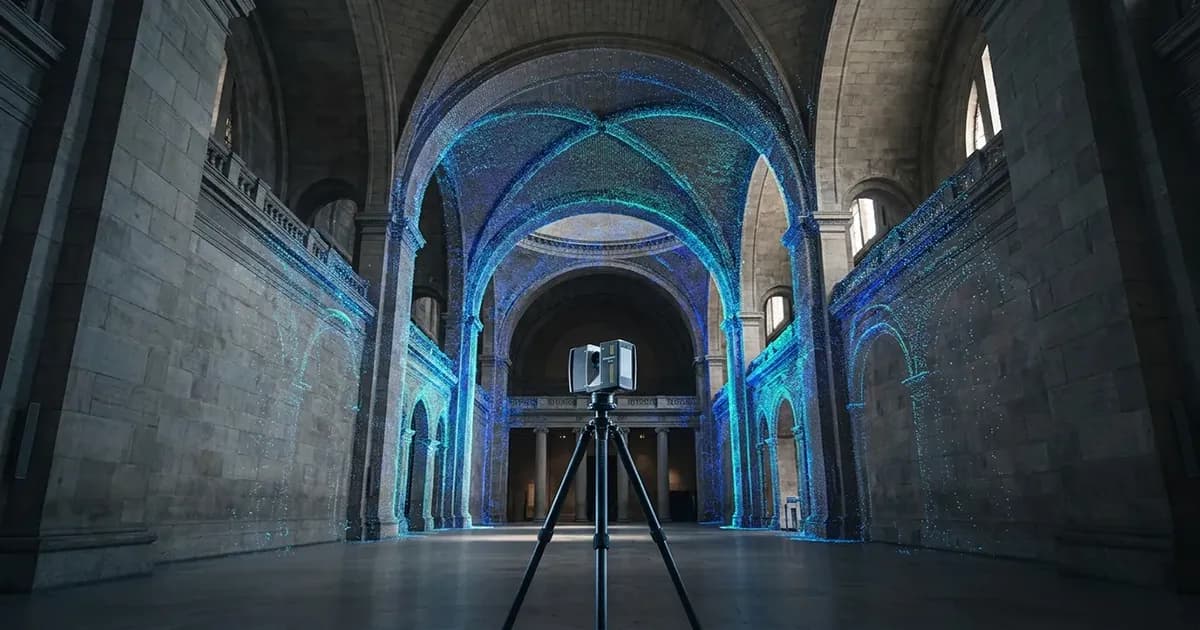
3D scanning works by stations. Each station is a 360-degree scan from a fixed point. The scanner rotates on itself and captures everything around it.
The principle:
- Place the scanner at a location
- Start the scan (1-3 minutes depending on density settings)
- The scanner captures a 360-degree point cloud from that point
- Move the scanner to the next point
- Repeat
How many stations? It depends on the space complexity:
- A simple rectangular room: 3-5 stations
- A museum with multiple rooms: 10-30 stations
- An exterior monument (full loop): 15-40 stations
- A complex space with levels and alcoves: 30-80+ stations
The rule: every point in the space must be visible from at least 2 stations. The more occlusions (pillars, walls, alcoves), the more stations you need.
Step 3: Density and Quality
Scanners offer point density settings. The higher the density, the more detailed the cloud, but the longer the scan takes and the heavier the file.
| Density | Points/station | Duration/station | Use Case |
|---|---|---|---|
| Low | 5-10 million | 30 seconds | Basic dimensional survey |
| Medium | 20-40 million | 1-2 minutes | Standard mapping |
| High | 80-150 million | 3-5 minutes | Fine architectural details |
| Very high | 300+ million | 10+ minutes | Heritage, archives |
My advice: for mapping, medium density is more than enough. The final 3D model will be simplified anyway to run in real time in a media server. Scanning at high density when you are going to simplify afterwards is wasting time on site.
Post-Processing
Station Assembly
Once all stations are captured, they must be assembled into a single coherent point cloud. This is called registration.
Automatic registration: modern scanners (Leica RTC360, Faro Focus) perform automatic pre-registration on site thanks to VIS (Visual Inertial System). Stations are pre-assembled in real time. All that remains is to verify and refine in the software.
Target-based registration: for maximum accuracy, targets (spheres or checkerboards) visible from multiple stations are placed. The software uses these common reference points to align the stations with each other.
Cloud-to-cloud registration: the software aligns stations by matching overlap areas between adjacent point clouds. This is the fastest method, but slightly less precise.
Cleanup
The raw point cloud contains noise that must be cleaned station by station:
- People who passed through the field during the scan
- Reflection artifacts (mirrors, glass, shiny surfaces)
- Outlier points at great distances
- Unwanted elements (temporary furniture, scaffolding)
This is manual work, station by station. Expect 15-30 minutes per station for thorough cleanup.
The Colored Point Cloud
Modern scanners also capture color (via an integrated camera). The result is a colored point cloud: each point has an XYZ position and an RGB color.
This is useful for:
- Visually identifying elements of the venue
- Serving as a visual reference for mapping content
- Navigating the space like a 3D 360-degree photo
Export and Usage
Raw Point Cloud
The complete point cloud can be exported in standard formats (E57, LAS, PLY). This is the richest format, but also the heaviest (several GB for a medium project).
Usage: archiving, precise measurements, integration into CAD software (Vectorworks, AutoCAD, Revit).
3D Mesh
For use in a media server (Modulo Kinetic, Disguise), the point cloud must be converted into a 3D mesh. This is a surface model composed of triangles.
The process:
- Automatic meshing: the software creates triangles between points
- Simplification: reducing the triangle count to lighten the model (from millions to a few tens of thousands)
- Correction: filling holes, smoothing surfaces
- Export: OBJ, FBX, or glTF formats
Mesh resolution:
- High resolution: 500K-5M triangles. Faithful to the scan, but heavy. For offline rendering and simulations
- Low resolution: 10K-100K triangles. Simplified, but sufficient for real-time mapping. This is the format usable in a media server
Integration into a Media Server
Once the mesh is exported, it integrates into the media server's 3D environment:
- Import the model into Modulo Kinetic (or equivalent)
- Verify the scale: the model must be at real scale (1 unit = 1 meter)
- Place virtual projectors at the planned positions
- Projection simulation: visualize the result before being on site
- Calibration: the 3D model serves as reference for calibrating the real projectors
This is the workflow that allows you to prepare 80% of the project upstream, from the office, and only have fine calibration to do on site.
Beyond Mapping: Other Uses for 3D Scanning
3D scanning of a venue serves well beyond video mapping:
AV Equipment Layout
The point cloud allows you to virtually place all technical equipment in the real space:
- Sound: speaker placement, sound coverage simulation
- Lighting: lighting fixture positions, angle simulation
- Video: projector positions, optical clearance verification
- Structure: trusses, rigging points, cabling
Architectural Survey
For heritage projects, the scan serves as an as-built survey. It documents the space as it actually is, with precision impossible to achieve manually. This is the basis for any feasibility study.
Scenography and Art Direction
Scenographers use 3D scanning to:
- Visualize the space from any angle
- Test scenography configurations virtually
- Create realistic renders before installation
- Communicate the project to stakeholders (management, clients, authorities)
Plans and Cross-Sections
From the point cloud, you can extract 2D plans and cross-sections at any location. This is sometimes the main deliverable for architects and engineering firms.
Cost and Timelines
Typical Budget
The cost of a 3D scan depends on the space size and post-processing complexity:
| Space | Number of Stations | Time on Site | Indicative Budget |
|---|---|---|---|
| Single room (200 sqm) | 5-10 | 1-2 hours | ★ |
| Museum (1,000 sqm) | 20-40 | 1 day | ★★ |
| Exterior monument | 30-60 | 1-2 days | ★★★ |
| Complex space (3,000+ sqm) | 60-100+ | 2-3 days | ★★★★ |
Post-processing (assembly, cleanup, mesh export) generally adds 1 to 3 days of work depending on complexity.
Should You Buy a Scanner?
No, unless you scan regularly (10+ projects per year). The hardware (scanner + software) represents a significant investment. For most projects, hire a specialized 3D scanning provider. It is their job, they have the equipment and the post-processing expertise.
Checklist Before a 3D Scan
Preparation:
- Define the exact perimeter to scan (indoor, outdoor, both?)
- Arrange free access to the space (no public, no construction work)
- Identify reflective surfaces to address
- Define deliverable needs: point cloud only, 3D mesh, 2D plans?
On site:
- Clear the space as much as possible
- Avoid foot traffic during scans
- Verify coverage: every area visible from at least 2 stations
- Do a quick assembly check before leaving the site
Post-processing:
- Verify the complete assembly (no misaligned stations)
- Clean station by station
- Export in the requested formats
- Verify the scale of the final model
FAQ
How long does a 3D scan take on site?
For a 500 sqm space, expect half a day. For a 3,000 sqm museum like MoAL in Manhattan (Kansas), one to two full days. Post-processing then takes 1 to 3 days.
Does scanning work outdoors?
Yes, terrestrial laser scanners work outdoors. Avoid rain (water droplets distort measurements) and direct sunlight on the scanner (overheating). Ideal conditions are overcast and dry weather.
What is the difference between a point cloud and a 3D model?
The point cloud is a set of millions of points in space. The 3D model (mesh) is a surface composed of triangles built from those points. The point cloud is the raw format, the mesh is the format usable for real-time mapping.
Can you scan a space while it is occupied?
Technically yes, but anything that moves during the scan creates artifacts in the point cloud ("ghost" people, objects moved between stations). The calmer the space, the cleaner the result.
Does 3D scanning replace an architect's plan?
It complements it. The scan captures the actual state of the venue (including deviations from the original plans). An architect's plan is a standardized document with representation conventions. The two are complementary, especially on heritage projects where the building has undergone modifications over time.
Need a 3D Scan for Your Project?
3D scanning is an investment that pays for itself from the first feasibility study. It makes sizing reliable, accelerates preparation, and reduces surprises on site.
Let's talk about your project toevaluate whether a 3D scan is relevant.
Additional resources:
- Preparing a mapping project: 2D vs 3D workflow: integrating the scan into your workflow
- Immersive museum mapping: a typical 3D scanning use case
- Complete video mapping guide: the fundamentals from A to Z

Video mapping consultant and trainer
Fifteen years of monumental and museum-grade installations: Arc de Triomphe (7 editions), Museum of Art and Light Kansas (108 projectors), Atelier des Lumières. Design, multi-projector calibration, audit, Modulo Kinetic training.
Need technical expertise?
Let's discuss your video projection or mapping project. Reply within 48h business hours.
Discuss your projectDid you enjoy this article?
Receive my upcoming tips, field experience and best practices straight to your inbox.
By subscribing, you agree to receive our emails. You can unsubscribe at any time.
1 email per week maximum, unsubscribe in 1 click