Complete Video Mapping Guide: From Concept to Show

Complete Video Mapping Guide: From Concept to Show
In short. Video mapping is the art of projecting visual content onto non-flat surfaces (facades, sculptures, scenographies, 3D objects) to turn them into dynamic screens. The technique rests on four technical pillars: proper sizing (lumens, lux, throw ratio, edge blending), an appropriate media server (Modulo, Watchout, Disguise, Resolume), precise calibration (manual warping or camera-based autocalibration), and content designed for the geometry of the surface. A successful project follows four phases: design (3D + digital mockup), preparation (equipment selection + workshop tests), installation (setup + on-site calibration), and operation (launch + supervision). Budgets range from 5,000 EUR for a short event to several million euros for a permanent installation like Atelier des Lumieres. This guide details each step, the common pitfalls, and the reference tools of the trade, based on Baptiste Jaze's 15 years of projects.
Introduction
Video mapping is the art of projecting images onto non-flat surfaces to transform them into dynamic screens. A building that crumbles, a sculpture that comes to life, a stage set that changes in real time: that is mapping.
Over 15 years of projects, from the Arc de Triomphe to Culturespaces immersive art centers, I have seen this discipline evolve from a technical niche reserved for a handful of specialists to an essential tool in events, culture and live performance. Today, mapping is everywhere: inaugurations, sound and light shows, immersive museums, product launches, concert stage designs.
But between the idea and the result, there is a demanding technical journey. A poor projector choice, approximate calibration, content poorly adapted to the surface: every step can tip a project from spectacular to mediocre.
This article is the guide I wish I had when I started. It covers the entire process, from the first site visit to the evening of the show. Whether you are a producer, technical director, creative or decision-maker, you will find the solid foundations to understand, plan and deliver a successful video mapping project.
What is video mapping?
The principle
Video mapping (or projection mapping) consists of projecting images or videos onto a three-dimensional surface, adapting the content to the exact geometry of that surface.
The difference from conventional projection: instead of projecting onto a flat, rectangular screen, you project onto a real object (a building, a car, a stage set, a sculpture) and the content perfectly follows its shapes. Windows, columns, edges and volumes become an integral part of the image.
The result: the object appears to transform. A building can seem to disintegrate brick by brick. A facade can become covered with vegetation. A theater set can change atmosphere in a fraction of a second.
How it works
The process relies on three fundamental steps:
- Surface survey: the exact geometry of the target object is measured and modeled (3D scan, photographic survey, or manual modeling)
- Content creation: graphic designers and motion designers create animations tailored to this geometry. Each element of the content corresponds to a physical element of the surface
- Calibration: the projection software (the media server) warps the projected image so it aligns pixel by pixel with the real surface. This is warping
What makes the discipline demanding is the precision required at every step. A few centimeters of offset between the content and the physical surface, and the illusion collapses.
Mapping vs conventional projection
| Criterion | Conventional projection | Video mapping |
|---|---|---|
| Surface | Flat, rectangular screen | Any type of 3D surface |
| Content | Standard format (16:9, 4:3) | Custom-made, adapted to the geometry |
| Calibration | Simple (centering, focus) | Complex (point-by-point warping) |
| Software | Standard video player | Specialized media server |
| Budget | Moderate | Higher (content + calibration) |
The different types of video mapping
Architectural mapping (monumental)
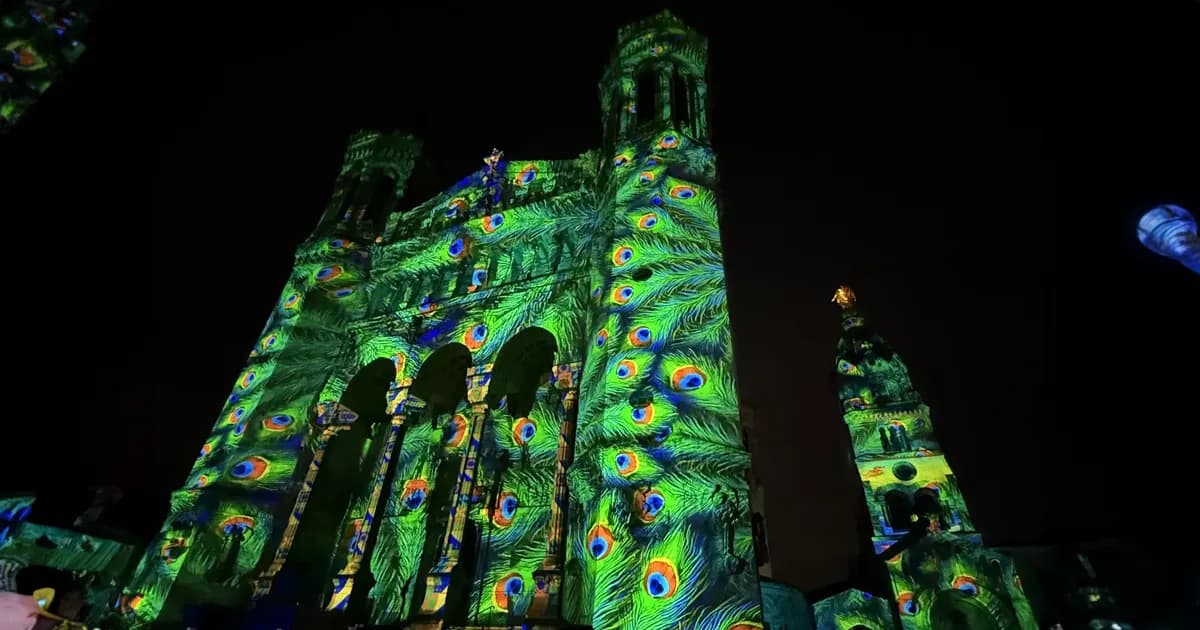
This is the most spectacular and most visible type. You project onto building facades, monuments and architectural structures. Year-end sound and light shows, inaugurations, festivals: this is architectural mapping.
Characteristics:
- Surfaces from 100 to 5,000 m2 and beyond
- High-brightness projectors (20,000 to 40,000+ lumens)
- Often multi-projection (4 to 30+ projectors)
- Outdoor projection, at night
- Audience at a distance (20 to 200 m)
Field example: On the Arc de Triomphe project, we used over 15 high-brightness projectors to cover the entire facade. Calibration required several days of on-site work.
Event mapping
Used for product launches, conferences, galas and concerts. Mapping transforms a stage set, a vehicle or a giant product. The goal is often to create a one-off "wow" moment, perfectly synchronized with a scenario.
Characteristics:
- Varied surfaces (sets, temporary structures, objects)
- Temporary installation (setup in a few hours to a few days)
- Synchronization with sound, light and pyrotechnics
- Tight timing constraints
Immersive mapping
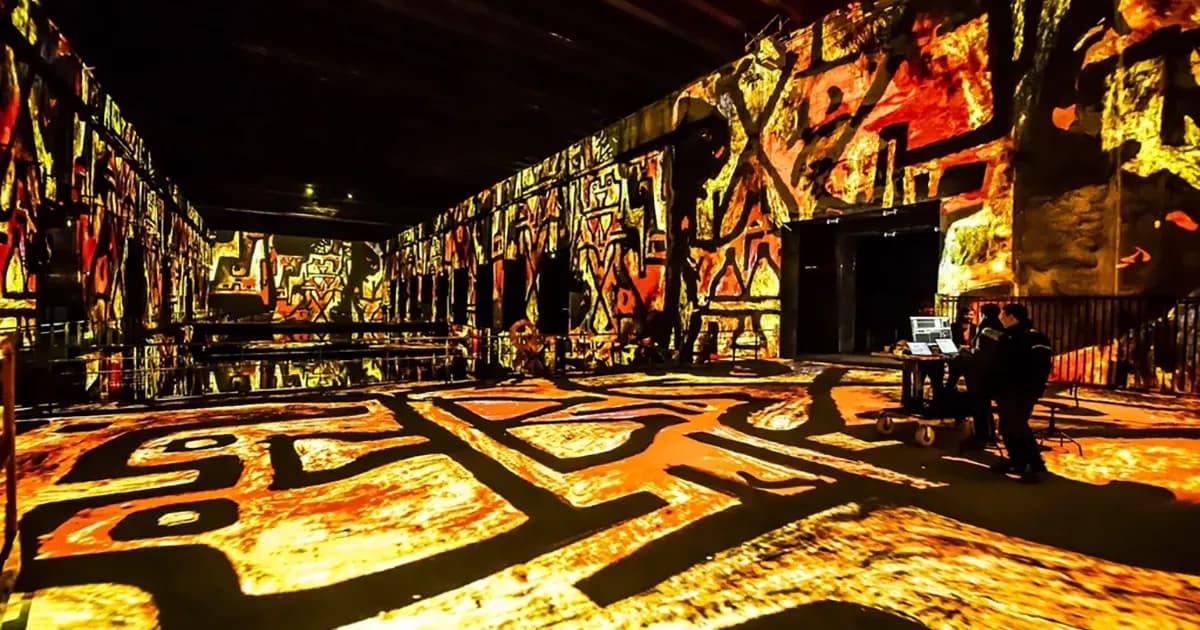
This is the fastest-growing sector. Entire spaces covered in projections where the visitor is immersed at the heart of the image. The "immersive experiences" featuring famous painters (Van Gogh, Klimt, Monet) are the best-known example.
Characteristics:
- Enclosed spaces (warehouses, galleries, dedicated venues)
- Projection on walls, floor and ceiling (360-degree coverage)
- Audience very close to the surfaces (2 to 5 m)
- Daily operation (permanent installation)
- High requirements for resolution and uniformity
Field example: The Culturespaces centers I worked with use dozens of projectors per venue to create total immersion. The main difficulty is uniformity: no area should appear darker or brighter than another.
Object mapping
Projection onto small or medium-sized objects: cars, sculptures, scale models, furniture, musical instruments. Often used in museum design, advertising or contemporary art.
Characteristics:
- Small surfaces (0.5 to 10 m2)
- Extremely precise calibration (the slightest offset is visible)
- Often short throw (projector very close to the object)
- Highly detailed content
Interactive mapping
The projected content reacts to audience actions: movement, touch, sound, presence. Sensors (infrared cameras, Kinect, pressure sensors) are used to detect interaction and modify the projection in real time.
Characteristics:
- Requires a real-time engine (TouchDesigner, Notch, Modulo Kinetic)
- Minimal latency (< 50 ms for smooth interaction)
- Increased complexity (sensors + processing + projection)
- High audience impact (maximum engagement)
Essential equipment
Projectors
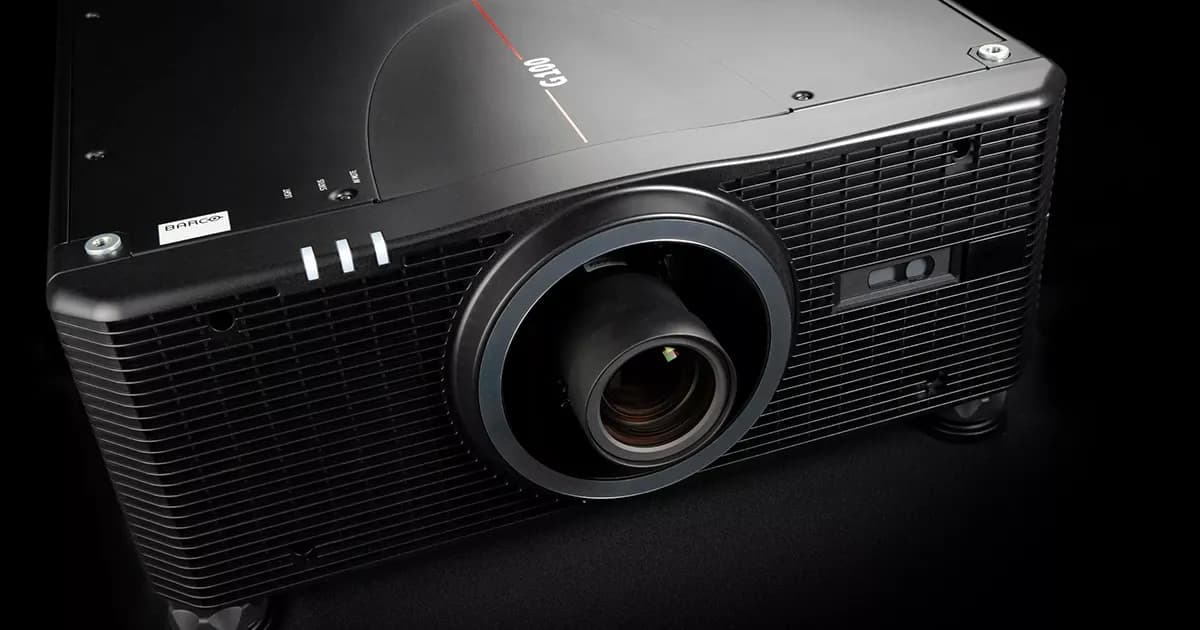
This is the heart of the installation. The projector choice dictates everything else: brightness, resolution, throw distance, budget.
Key criteria:
- Luminous output: measured in ANSI lumens, to be converted to lux on the surface
- Native resolution: Full HD, WUXGA or 4K depending on the project
- Technology: 3-chip DLP for high-end, LCD for tighter budgets
- Lens: interchangeable preferred, with lens shift
- Light source: laser for permanent installations, lamp acceptable for one-off events
Further reading: The article Which projector to choose for mapping? details the 6 field-tested criteria for making the right choice.
Free tool: The projection calculator converts lumens to lux and determines the lens needed for your setup.
Media server
The media server is the brain of the installation. It plays the content, warps it to fit the surface, manages blending between projectors, and synchronizes everything with sound and light.
Market references:
- Modulo Kinetic / Modulo Pi: made in France, widely used in architectural and immersive mapping. This is the tool I use most
- Modulo Player: same Modulo Pi ecosystem, designed for professional installations with up to 6 outputs per server. Reliable, built to run 24/7, excellent features-to-price ratio
- Resolume Arena: popular for VJing and events, more accessible
- Watchout (Dataton): strong in multi-screen and permanent installations
- TouchDesigner: real-time engine, ideal for interactive mapping
Detailed comparison: Which media server to choose for video mapping?
Lenses and positioning
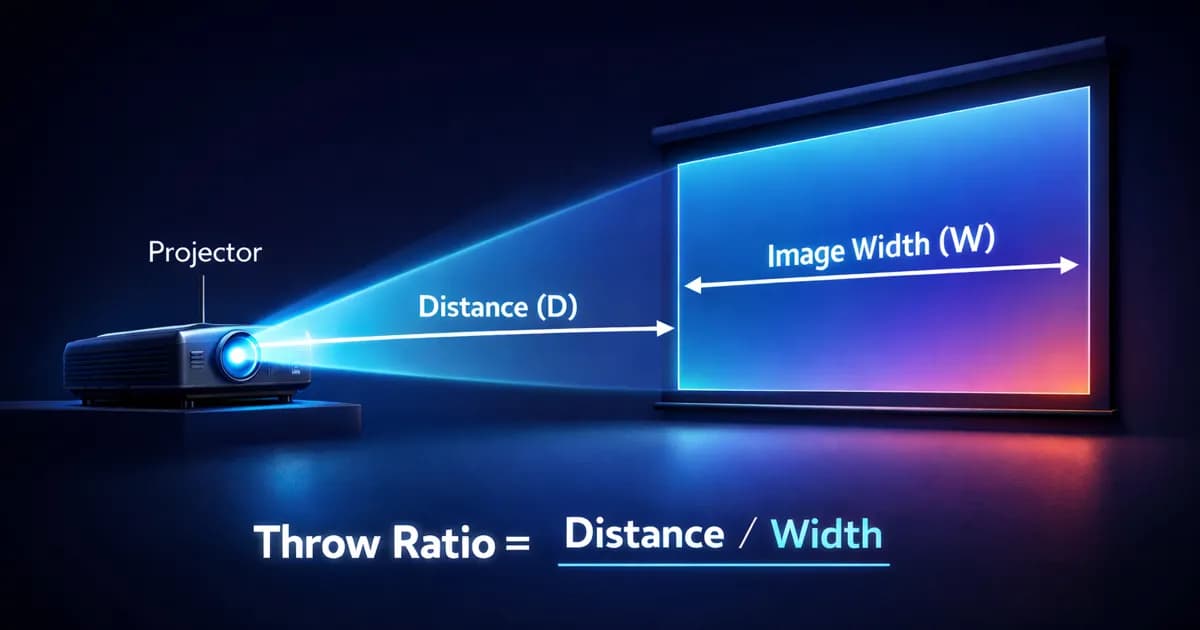
The lens choice depends on the required throw ratio: the ratio between the throw distance and the image width. A throw ratio of 1.5 means that at 15 meters distance, you get a 10-meter wide image.
Categories:
- Ultra short throw (TR < 0.5): projector virtually flush with the surface. For immersive spaces
- Short throw (TR 0.5-1.0): close-range projection, medium-sized rooms
- Standard (TR 1.0-2.0): the most common in events
- Long throw (TR > 2.0): long-distance projection, monumental mapping
Calculate your throw ratio: The projection calculator automatically determines the right lens for your distance and surface.
Cabling and signal
Never underestimate cabling. It is a line item often forgotten in the initial budget, yet it is a frequent source of on-site problems.
Standards:
- HDBaseT over Cat6 cable (up to 100 m): the current standard for professional installations
- SDI: robust, long distances, broadcast standard
- Fiber optic: for very long distances (> 100 m) or environments with interference
- HDMI: limited to 15 m, acceptable for small installations only
Field rule: Always plan for 20% extra cable. On site, cable runs are never as short as they are on the plan.
Field accessories
- Support structures: towers, trusses, ceiling mounts. Projector positioning is critical
- Protective enclosures: mandatory outdoors (rain, dust, vandalism)
- Electrical power: a 30,000-lumen projector draws 2 to 3 kW. Multiply by the number of projectors
- Network: managed switch, dedicated network cabling for control
The complete workflow of a mapping project
1. Site survey and technical assessment
Everything starts with a site visit. The goal: understand the space, measure the surfaces, identify constraints.
What to record:
- Exact dimensions of projection surfaces
- Available throw distance for projectors
- Mounting points and possible positions
- Available electrical power
- Ambient light (light pollution, urban lighting)
- Access constraints (schedules, permits, logistics)
My advice: Never skip the site survey. Even if you have architectural plans, go on site. Plans lie (or at least, they do not tell the whole story).
Related article: Mapping project preparation workflow details each step of the preparation process.
2. Surface modeling
From the survey, a digital model of the projection surface is created. This model will serve as the basis for content creation and calibration.
Methods:
- 3D scan (Lidar): the most precise. A laser scanner captures the exact geometry in millions of points. Essential for complex surfaces
- Photogrammetry: 3D reconstruction from photographs. Less precise than Lidar, but more accessible
- Manual modeling: from plans and field measurements. Sufficient for simple geometric surfaces (flat facade, cube, cylinder)
The method choice depends on the surface complexity and the budget. For a relatively flat building facade, manual modeling is enough. For a historic monument with moldings and sculptures, 3D scanning is virtually essential.
3. Content creation
This is the creative part. Graphic designers and motion designers create the animations that will be projected onto the surface.
Mapping-specific constraints:
- Content must match the 3D model geometry exactly
- Architectural elements (windows, columns, cornices) must be integrated into the design
- Content resolution depends on the total canvas resolution (number of projectors x individual resolution, minus overlaps)
- Content must be tested in real conditions, not just on a monitor
Common creation software: After Effects, Cinema 4D, Blender, Notch, TouchDesigner, Unreal Engine.
Common mistake: Creating content before the final technical survey is completed. Result: weeks of creative work to redo because the actual dimensions do not match the initial assumptions.
Read more: Pre-production mistakes in video mapping to avoid the classic pitfalls of this phase.
4. Installation and positioning
D-day (or rather D-days, because installation takes time). Projectors are positioned, cabled and powered.
Critical points:
- Support stability: a projector that moves by 2 mm causes an offset of several centimeters on the surface. Structures must be absolutely stable
- Accessibility: being able to access projectors for adjustments. Plan for scissor lifts or scaffolding if necessary
- Ventilation: projectors generate heat. In an enclosed housing, plan for sufficient air extraction
- Electrical safety: residual current device, grounding, rain protection for outdoor installations
5. Calibration and warping
This is the most technical step. Warping involves distorting the projected image so it aligns perfectly with the real surface.
The process:
- Project a test pattern (reference grid) onto the surface
- Adjust corners and intermediate zones point by point
- Verify alignment with the actual content
- Fine-tune (pixel by pixel if necessary)
In multi-projection: Each projector must be calibrated individually, then the overlaps (edge blending) between adjacent projectors are adjusted.
Calibration can be manual (point by point in the media server) or camera-assisted (auto-calibration). Auto-calibration significantly speeds up the process, especially on large installations with many projectors.
Related articles:
6. Edge blending
As soon as you use multiple projectors side by side, you need to manage the overlap zone between images. This is blending.
Key parameters:
- Overlap size (10-20% of image width)
- Blending curve (gamma or sigma preferred)
- Black level compensation
- Brightness harmonization between projectors
Good blending is invisible. Bad blending is a bright or dark band cutting the image in two.
Complete guide: Edge blending: achieving seamless overlap between projectors
Tool: The multi-projector calculator determines the optimal configuration and overlap zones for your surface.
7. Testing and rehearsals
Before the show, you test. Extensively.
What to check:
- Full alignment (is calibration stable?)
- Color and brightness uniformity
- Audio/video synchronization
- Transitions between sequences
- Behavior in case of failure (failover)
- Rendering at distance (from the audience viewpoint)
Field rule: Always schedule a full test session the day before the show. Not the same day. Last-minute surprises are the norm, not the exception.
8. Show and operation
On the evening of the show, everything must run smoothly. The projection technician's role is to monitor, not to intervene.
Live risks:
- Projector thermal drift (the image shifts slightly as it heats up)
- Network or signal failure
- Projector failure (hence the importance of a spare)
- Weather conditions (wind, humidity, temperature)
For permanent installations: The challenge is long-term maintenance. Projectors age, calibrations drift, content needs updating. Plan a maintenance contract from the design phase.
Budget: how much does a mapping project cost?
This is the question everyone asks. And the honest answer is: it depends. But here are some ballpark figures to help you plan.
Cost breakdown
| Item | Share of budget | Notes |
|---|---|---|
| Equipment (projectors, lenses, cabling) | 30-40% | Rental or purchase |
| Content (graphic creation) | 20-35% | The most variable item |
| Installation (structure, cabling) | 10-20% | Depends on site complexity |
| Calibration and programming | 10-15% | Technician time on site |
| Logistics (transport, power) | 5-10% | Often underestimated |
Ranges by project type
Event mapping (small surface, 1-2 projectors): Entry-level budget. Product launch, stage set, object mapping.
Medium facade mapping (50-200 m2, 4-8 projectors): 3 to 5 times the entry-level budget. Inauguration, local festival, corporate event.
Monumental mapping (500+ m2, 10-30 projectors): 10 to 50 times the entry-level budget. Sound and light show, national monument, prestige event.
Permanent immersive installation: Orders of magnitude above event budgets. Museum, art center, attraction. Content and integration represent the majority of the budget.
How to optimize the budget
- Size correctly: neither too many nor too few projectors. The multi-projector calculator prevents oversizing
- Rent equipment for one-off events (no capital locked up)
- Repurpose content: an architectural mapping can be adapted into a short version, video captures for social media, etc.
- Plan logistics ahead: last-minute extras (additional scissor lift, cable extension, emergency overnight work) blow budgets
Mistakes that cost dearly
Over 15 years of projects, I have identified recurring mistakes. Some are anecdotal, others can compromise an entire project.
1. Underestimating the site survey
Projecting based on architectural plans is not projecting on a building. Plans are often approximate, especially for older buildings. A thorough field survey is the best investment in the project.
2. Creating content too early
Until the technical survey is finalized, content work should not begin. I have seen creative teams spend weeks working on a format that did not match the actual dimensions. Tens of thousands of euros wasted.
3. Choosing projectors on paper
Manufacturer specs do not tell the whole story. Two "identical" projectors can produce very different results. Always test equipment in real conditions before making a final decision.
4. Neglecting blending
In multi-projection, blending is what separates a professional result from an amateur one. It is a specific skill that requires time and experience.
5. Forgetting maintenance
For permanent installations: a mapping system without a maintenance plan is a system that will drift within a few months. Calibration, lens cleaning, filter replacement, content updates.
6. Undersizing brightness
The classic mistake. You pick slightly less powerful projectors to save money, and the result is disappointing. In mapping, it is better to have a little too much brightness than not enough. Ambient light, equipment aging and the nature of the surface always consume more lumens than you think.
Related article: Which projector to choose for mapping?
FAQ
What is the difference between video mapping and conventional projection?
Conventional projection sends a rectangular image onto a flat screen. Video mapping adapts the image to the geometry of a 3D surface (building, object, set). The content is custom-made to follow the surface shapes, and specialized software (media server) warps the image so it aligns perfectly.
Can you do mapping in daylight?
Technically, yes, with sufficiently powerful projectors. In practice, it is very difficult and expensive. Sunlight is incomparably stronger than any projector. Daytime mapping requires very high-brightness projectors (40,000+ lumens) and a favorable surface (indoors or shaded). The vast majority of outdoor mapping projects are done at night.
How many projectors are needed for facade mapping?
It depends on the surface size and the desired resolution. For a 20 m wide facade in Full HD, 2 to 4 projectors are enough. For a 100 m facade with good resolution, expect 10 to 20 projectors or more. The multi-projector calculator gives you the exact answer.
What software should you use for video mapping?
The main professional media servers are Modulo Kinetic (large 3D projects, made in France), Modulo Player (professional installations, same ecosystem), Resolume Arena (accessible, VJing), and Watchout (multi-screen). The choice depends on the project type and budget. See the media server comparison.
Does mapping damage buildings?
No. Video mapping involves no physical contact with the surface. It is projected light. There is no attachment, no drilling, no residue. This is actually one of its advantages for historic monuments.
What resolution for mapping?
The useful resolution depends on the projected pixel size and the audience distance. In monumental mapping (audience at 30 m+), a pixel of 8-10 mm is acceptable, and Full HD is often enough per projector. In immersive spaces (audience at 2-3 m), aim for a pixel of 2-3 mm, which requires 4K or dense multi-projection.
Can you add interactivity to a mapping?
Yes, by combining projection and sensors (cameras, infrared, radar). The content is generated in real time by an engine like TouchDesigner or Modulo Kinetic. It is more complex and more costly than pre-rendered mapping, but the impact on the audience is considerable.
How long does it take to set up a mapping?
For a small event mapping (1-2 projectors): 1 day of installation and calibration. For facade mapping (4-8 projectors): 2 to 5 days. For a permanent immersive installation: several weeks to several months, including fine calibration and testing.
📖 The full method: Projector calibration: the field guide covers the process step by step, from test patterns to edge blending.
Need support for your project?
Video mapping is a field-based profession. Every project is unique, and the technical decisions made early on shape everything that follows. If you have a project underway or in the planning stage, it is better to get guidance early than to fix things after the fact.
Let's talk about your project toidentify the right technical options.
Not ready to talk yet? Explore our free calculation tools to start sizing your installation:
- Projection calculator: lumens, lux, throw ratio
- Multi-projector calculator: optimal multi-projector configuration
- Lumeo 3D simulator: visualize your installation in 3D

Video mapping consultant and trainer
Fifteen years of monumental and museum-grade installations: Arc de Triomphe (7 editions), Museum of Art and Light Kansas (108 projectors), Atelier des Lumières. Design, multi-projector calibration, audit, Modulo Kinetic training.
Need technical expertise?
Let's discuss your video projection or mapping project. Reply within 48h business hours.
Discuss your projectDid you enjoy this article?
Receive my upcoming tips, field experience and best practices straight to your inbox.
By subscribing, you agree to receive our emails. You can unsubscribe at any time.
1 email per week maximum, unsubscribe in 1 click