Video Connectors: SDI, HDMI, NDI, DisplayPort

Video Connectors: SDI, HDMI, NDI, DisplayPort
In short. Six video connectors share professional installations. SDI (Serial Digital Interface) is the broadcast and live performance standard: robust, up to 100 m on coaxial, 3G-SDI handles 1080p60, 12G-SDI handles 4K60, with native integration into video routers and matrices. HDMI 2.1 supports 4K120 or 8K60 but passive cable length is limited to 5 to 10 m (beyond that, plan for active extenders or AOC fiber cables). DisplayPort equips media server GPU outputs (DP 1.4 for 4K144 or 8K60), often converted to SDI or HDMI on arrival. HDBaseT carries HDMI over RJ45 up to 100 m, ideal for permanent installations. Optical fiber (OM3, OM4) enables 4K over several hundred meters, essential for extended sites. NDI (Network Device Interface) streams video over standard IP networks, practical for live production but compressed.
Introduction
You have the right projector, the right content, the right media server. And the signal does not arrive. Or it arrives, but with artifacts. Or it arrives in 1080p when you were expecting 4K.
Video connectors are the link everyone considers simple until the moment it does not work. Each interface has its strengths, its limits, its pitfalls. And on a mapping project with multiple projectors, multiple servers, and significant cabling distances, choosing the right connector can make the difference between a smooth setup and a debugging nightmare.
This article reviews the video interfaces used in professional video projection: SDI, HDMI, DisplayPort, HDBaseT, fiber optics, and NDI.
SDI (Serial Digital Interface)
Characteristics
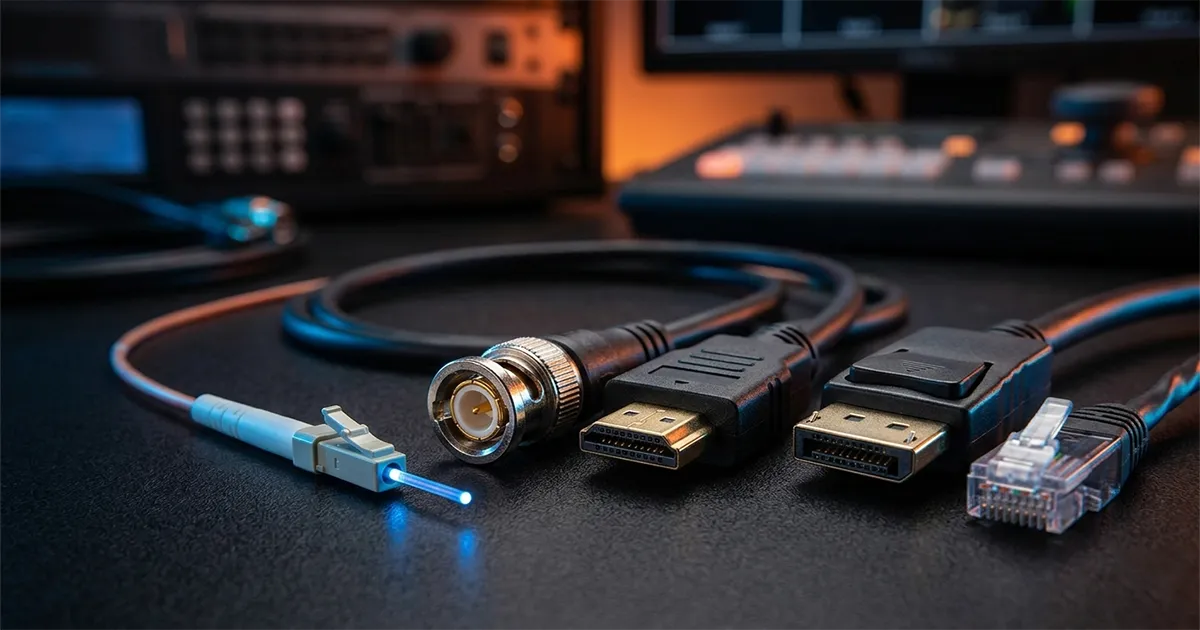
SDI is the broadcast industry and live performance standard. It is the BNC connector you find on all professional equipment.
| Version | Bitrate | Max Resolution | Year |
|---|---|---|---|
| SD-SDI | 270 Mbps | 480i/576i | 1989 |
| HD-SDI | 1.485 Gbps | 1080i/720p | 1998 |
| 3G-SDI | 2.97 Gbps | 1080p60 | 2006 |
| 6G-SDI | 6 Gbps | 2160p30 (4K) | 2015 |
| 12G-SDI | 12 Gbps | 2160p60 (4K) | 2015 |
| 24G-SDI | 24 Gbps | 4320p60 (8K) | 2020 |
Strengths
- Distance: up to 100 meters on standard coaxial cable (BNC 75 ohm), without any intermediate device. This is the major advantage of SDI over HDMI
- Reliability: locking BNC connector (no accidental disconnection)
- Ruggedness: coaxial cable is more durable than an HDMI cable. It handles cable runs, repeated coiling, and touring conditions
- Multi-stream: professional media servers typically have 4 to 8 SDI outputs
- Genlock: native synchronization between sources (crucial for multi-projector setups)
Limitations
- Resolution: 12G-SDI maxes out at 4K60. For higher resolutions, you need Quad-Link (4 cables)
- No built-in multi-channel audio by default (audio embedders exist, but that is an additional device)
- Not on entry-level projectors: SDI is absent from consumer and semi-pro models
Use Case in Mapping
SDI is the default choice for media server to projector links in professional contexts. The 100 m range without an extender covers the majority of venue configurations. For monumental outdoor mapping, combine SDI with fiber optics for long distances.
HDMI (High-Definition Multimedia Interface)
Characteristics
HDMI is the most widespread interface. Present on all equipment, from laptops to projectors.
| Version | Bitrate | Max Resolution | HDR | Year |
|---|---|---|---|---|
| HDMI 1.4 | 10.2 Gbps | 4K30 | No | 2009 |
| HDMI 2.0 | 18 Gbps | 4K60 | HDR10 | 2013 |
| HDMI 2.1 | 48 Gbps | 8K60 / 4K120 | HDR10+ | 2017 |
Strengths
- Universality: present on all equipment
- Audio + video: a single cable for everything (up to 7.1 audio channels)
- HDCP: digital rights management (necessary for certain protected sources)
- CEC: remote equipment control via the HDMI cable
Limitations
- Distance: 15 meters maximum on standard passive cable. Beyond that, the signal degrades (flickering, color loss, no signal)
- Fragile connector: no locking mechanism. A cable that disconnects during a show happens
- HDCP compatibility: if any link in the chain does not support the same HDCP version, the signal is blocked or degraded
- Active cables and extenders: beyond 15 m, you need active HDMI cables (fiber optics inside the cable) or HDBaseT extenders. These solutions add complexity and failure points
Use Case in Mapping
HDMI is used as a last resort for short distances (direct server-to-projector link under 10 m) or when the projector lacks an SDI input. On a serious multi-projector project, avoid HDMI: the distance limitation and connector fragility are deal-breakers.
DisplayPort
Characteristics
DisplayPort is the native interface of graphics cards. It is what comes out of your GPU.
| Version | Bitrate | Max Resolution | Year |
|---|---|---|---|
| DP 1.2 | 21.6 Gbps | 4K60 | 2010 |
| DP 1.4 | 32.4 Gbps | 8K30 / 4K120 | 2016 |
| DP 2.1 | 80 Gbps | 16K60 / 8K60 | 2022 |
Strengths
- Bitrate: DisplayPort 2.1 is the highest-bitrate interface. It handles resolutions that other interfaces cannot support
- Daisy-chain: ability to chain multiple displays on a single output (MST - Multi-Stream Transport)
- No mandatory HDCP: fewer digital rights compatibility issues
- Mini-DP and USB-C connectors: compact variants for laptops and portable sources
Limitations
- Distance: 3 meters on passive cable for high bitrates (8K), 15 meters at lower resolutions
- Rare on projectors: few projectors have a native DisplayPort input
- Not standard in the broadcast world: SDI dominates, DisplayPort remains confined to graphics cards and computer monitors
Use Case in Mapping
DisplayPort is the output of your media server (graphics card). It is converted to SDI, HDMI, or HDBaseT via a converter or a dedicated output card (AJA, Blackmagic, Datapath). You rarely use it end-to-end.
HDBaseT
Characteristics
HDBaseT transports the video signal over Ethernet cable (RJ45 Cat6/Cat6a). It is a transport protocol, not a new connector.
Strengths
- Distance: 100 meters on a standard Cat6a cable
- Existing cabling: uses existing network infrastructure (no special cables needed)
- Integrated transport: video + audio + Ethernet + control (IR, RS-232) + power (PoH) on a single cable
- Cable cost: a Cat6a cable costs much less than an SDI cable of the same length
Limitations
- Transmitter/receiver boxes: you need a transmitter on the source side and a receiver on the projector side. Each pair adds cost and a potential failure point
- Latency: a few extra milliseconds compared to a direct link (negligible for mapping, critical for gaming)
- 4K60 4:4:4: requires HDBaseT 3.0, not all transmitters/receivers are compatible
- Interference: sensitive to electromagnetic interference if the cable runs near power cables
Use Case in Mapping
HDBaseT is excellent for permanent installations (museums, hotels, retail) where network infrastructure already exists. It allows transporting the video signal over long distances at lower cost. For temporary events, SDI remains more practical (no transmitter/receiver boxes to manage).
Fiber Optics
Characteristics
Fiber optics transport the video signal over very long distances without loss. This is the solution for large-scale installations.
Strengths
- Distance: 300 meters to several kilometers depending on the fiber type and protocol
- Interference immunity: fiber optics are impervious to electromagnetic interference
- Bitrate: no practical limit for current resolutions (10 Gbps to 100+ Gbps)
- Lightweight: a fiber cable is much lighter than a coaxial cable of the same length
Limitations
- Fragility: the minimum bend radius is strict. A fiber cable bent too tightly is destroyed. Ruggedized (tactical) models are more durable but also more expensive
- Connectors: fiber connectors (LC, SC, ST) require special care (cleanliness, no dust). A dirty connector = no signal
- Converters: optical/electrical converters are needed at each end (unless the equipment has a native fiber input, which is rare on projectors)
- Cost: professional fiber converters represent a significant budget
Use Case in Mapping
Fiber optics are essential for monumental outdoor mapping (facades, monuments) where the distance between the control room and projectors exceeds 100 meters. Typically, the signal leaves the media server as SDI or DisplayPort, is converted to optical for long-distance transport, then converted back to SDI to enter the projectors.
NDI (Network Device Interface)
Characteristics
NDI (NewTek/Vizrt) transports the video signal over a standard IP network (Ethernet). It is video transport over a computer network.
| Version | Compression | Latency | Resolution |
|---|---|---|---|
| NDI Full | Light (SpeedHQ) | 1-3 frames | Up to 4K |
| NDI | HX | Heavy (H.264/H.265) | 3-8 frames |
| NDI 6 | Improved | <1 frame | 4K+ |
Strengths
- Standard network: uses existing network infrastructure (Gigabit or 10 Gbps switch)
- Multi-source: a network switch can transport dozens of simultaneous NDI streams
- Auto-discovery: NDI sources are automatically found on the network (zeroconf)
- Easy monitoring: any PC on the network can display an NDI stream (free NDI Monitor)
- Bidirectional: can transport video, audio, and metadata in both directions
Limitations
- Compression: NDI compresses the signal. It is not pixel-perfect transport like SDI
- Network: requires a dedicated network or a network with sufficient bandwidth. A full NDI stream at 1080p60 consumes approximately 125 Mbps
- Latency: even with NDI Full, latency is higher than direct SDI (1-3 frames, i.e., 20-60 ms)
- No genlock: synchronization between NDI sources is less precise than SDI with genlock
Use Case in Mapping
NDI is useful for:
- Preview: sending a monitoring stream from the media server to a remote control station
- Source integration: retrieving camera feeds, computer outputs, or other server streams on the network
- Permanent installations: in a network-cabled building, NDI avoids running dedicated video cables
For the final media server to projector link, SDI remains preferable (no compression, no latency, genlock).
How to Choose?
Decision Table
| Criterion | SDI | HDMI | HDBaseT | Fiber | NDI |
|---|---|---|---|---|---|
| Distance < 15 m | Yes | Yes | No (overkill) | No (overkill) | Yes |
| Distance 15-100 m | Yes | No | Yes | Yes | Yes |
| Distance > 100 m | No | No | No | Yes | Yes (network) |
| Temporary event | Yes | Backup | Possible | Yes | Possible |
| Permanent installation | Yes | Possible | Yes | Yes | Yes |
| Multi-projector sync | Yes (genlock) | No | No | Yes | No |
| Cabling budget | Medium | Low | Low (cable), medium (boxes) | High | Low |
| Connector reliability | High | Low | High | Medium | N/A (network) |
Recommendations by Project Type
Standard event mapping (1-6 projectors, venue): SDI from server to projectors. Simple, reliable, proven.
Monumental outdoor mapping (6+ projectors, long distance): Fiber optics from the control room to the projector racks, then SDI from the racks to the projectors.
Permanent museum installation: HDBaseT if the network infrastructure exists, SDI otherwise. NDI for monitoring and secondary streams.
Small project / presentation: HDMI on a short cable (< 10 m). Simple and sufficient.
Common Mistakes
HDMI Cable Too Long
The most frequent problem. Beyond 10-15 meters, the HDMI signal degrades: flickering, color loss, intermittent signal loss. The solution is not a "better HDMI cable": it is switching interfaces (SDI, HDBaseT, or active fiber HDMI).
HDCP Blocking the Signal
Your source (laptop) sends an HDCP signal. Your converter or scaler does not support HDCP. Result: black screen. Check HDCP compatibility across the entire chain before setup.
No Genlock in Multi-Projector Setups
Without synchronization (genlock), projectors do not refresh at the same time. On edge blending, this creates a visible offset in the overlap zone (tearing). Use SDI genlock or projector frame-lock synchronization.
Wrong Network Cable Type for NDI/HDBaseT
Cat5e works for NDI 1080p over short distances, but Cat6a is the minimum for reliable NDI 4K or HDBaseT over 100 meters. Invest in the right cable from the start.
FAQ
Can you mix interfaces in the same project?
Yes, and it is common. A typical project uses DisplayPort (GPU output) to SDI converter to SDI cable to projector. Or DisplayPort to fiber optics to SDI to projector. The important thing is that each conversion is clean and the chain supports the desired resolution and framerate.
Does HDMI 2.1 solve the distance issues?
No. HDMI 2.1 increases bitrate (48 Gbps, meaning 8K60), but the maximum passive cable distance remains 3 to 5 meters at full bitrate. For long distances, use active HDMI 2.1 cables (integrated fiber optics), but you lose the simplicity and reliability of true SDI.
Can NDI replace SDI for mapping?
For preview and monitoring, yes. For the final server-to-projector link in demanding contexts (synchronized multi-projector, live show), SDI remains superior thanks to genlock and the absence of compression. NDI 6 closes the gap, but SDI remains the reference.
Are "certified" cables necessary?
For SDI: a professional-quality BNC 75 ohm cable (Belden, Canare) is sufficient. Avoid cables costing a few dollars on Amazon. For HDMI: "Ultra High Speed" certified cables are necessary for HDMI 2.1 at full bitrate. For fiber: use ruggedized "tactical" cables for events (Neutrik opticalCON) and standard fiber for permanent installations.
Need Help with Your Video Cabling?
Interface choices and the cabling plan are an integral part of a mapping project's technical study. A poor choice at this stage costs dearly during setup.
Let's talk about your project to define the video architecture of your project.
Additional resources:
- Which projector to choose for mapping?: hardware selection criteria
- Mapping troubleshooting: resolving signal failures
- Complete video mapping guide: the fundamentals from A to Z

Video mapping consultant and trainer
Fifteen years of monumental and museum-grade installations: Arc de Triomphe (7 editions), Museum of Art and Light Kansas (108 projectors), Atelier des Lumières. Design, multi-projector calibration, audit, Modulo Kinetic training.
Need technical expertise?
Let's discuss your video projection or mapping project. Reply within 48h business hours.
Discuss your projectDid you enjoy this article?
Receive my upcoming tips, field experience and best practices straight to your inbox.
By subscribing, you agree to receive our emails. You can unsubscribe at any time.
1 email per week maximum, unsubscribe in 1 click