How to Choose the Right Projector for Video Mapping

How to Choose the Right Projector for Video Mapping
In short. Choosing a projector for mapping rests on six field criteria more useful than marketing spec sheets. First: real ANSI or ISO measured lumens, not peak manufacturer figures, scaled to the projected surface to derive lux. Second: resolution scaled to the projected pixel size (a 4K over 20 meters produces larger pixels than a Full HD over 5 meters). Third: compatibility with a lens appropriate to the target throw ratio and the useful zoom range. Fourth: imaging technology (3-chip DLP for color fidelity, LCoS for contrast, single-chip DLP for budget). Fifth: light source (laser-phosphor for lifespan and stability, lamp for initial cost). Sixth: connectivity and show control (HDBaseT, SDI, Genlock, network management for multi-projector parks). Each criterion contributes differently depending on whether the project is event-based or permanent.
Introduction
The projector is the heart of your mapping installation. Getting this choice wrong means compromising the entire project: washed-out image, disappointing resolution, blown budget, or worse, an emergency equipment swap the night before the event.
In 15 years of work, from the Arc de Triomphe to Culturespaces immersive art centers, I've seen dozens of projects suffer from a bad projector choice. And in 90% of cases, the mistake came from poor scoping upfront.
This article isn't a model comparison. It's a field guide for asking the right questions before making your choice.
The 6 Criteria That Actually Matter
Forget the endless spec sheets. In the field, here are the 6 criteria that make the difference.
1. Real lumens vs marketing lumens
First trap: not all lumens are equal. Manufacturers use different metrics that don't measure the same thing:
- Lumens (or "peak" lumens): maximum value measured at the center of the image, under the most favorable conditions. The most flattering number, and the least representative
- ANSI lumens: standardized measurement across 9 points of the image. More reliable, but not all manufacturers provide it
- Center lumens: center-only measurement, often 20 to 30% higher than ANSI lumens
Field rule: When a manufacturer states a lumen figure without specifying the method, be cautious. Always ask for ANSI lumens. And even with an ANSI value, expect to only use 60-70% of that power under real mapping conditions (color filters, dark content, source aging).
What matters isn't lumens, it's lux, the actual light intensity on your projection surface. A 20,000-lumen projector on a 30-meter facade won't produce the same result as a 10,000-lumen unit on a 5-meter wall.
But even lux remain a theoretical value. In practice, the result depends heavily on the surface you're projecting onto:
- Flat, light-colored wall (limestone facade, white tensioned screen): good reflectance, the theoretical calculation is close to reality
- Dark or textured wall (brick, raw concrete, dark wood): the surface absorbs a significant portion of the light. Plan for 30 to 50% more power
- Surface with irregularities (architectural relief, moldings, sculptures): light disperses into recesses and cast shadows reduce perceived brightness. The more pronounced the relief, the more you need to compensate
Field rule: For outdoor nighttime mapping with low light pollution on a light surface, aim for at least 60-80 lux. In lit urban environments or on dark/textured surfaces, go to 150 lux or more. And in all cases: run an on-site test before finalizing your choice.
Free tool: The projection calculator automatically converts lumens to lux based on your surface size and projection distance.
2. Native resolution
4K isn't always the answer. It may seem counterintuitive, but in mapping, the projector's native resolution is only part of the equation.
What really matters is the projected pixel size. If your projected pixel is 8mm (typical on a large facade), the difference between Full HD and 4K will be invisible at the audience's viewing distance.
When 4K is worth it:
- Indoor immersive space where the audience is very close to the surface
- Projection on a small surface (less than 5m wide)
- Content with fine text or precise details
When Full HD is enough:
- Monumental mapping (facade > 15m)
- Audience at distance (> 10m from the surface)
- Multi-projector setup (the number of projectors compensates for individual resolution)
3. Projection technology
Three technologies dominate the professional market. Each has its strengths and weaknesses depending on the context.
DLP (Digital Light Processing)
- In three-chip DLP (3-chip) version: best contrast on the market, deep blacks, accurate colors
- No visible screen-door effect (ideal for multi-projector blending)
- Watch out for the rainbow effect on single-chip consumer models (not an issue on pro 3-chip DLP)
- Recommended for: monumental mapping, high-end events, any installation where contrast and image quality matter
LCD (Liquid Crystal Display)
- Vivid, saturated colors
- Good brightness for the price
- Slight screen-door effect visible up close (less of an issue in large-scale mapping)
- Recommended for: indoor installations with sufficient viewing distance, budget-conscious events
LCoS (Liquid Crystal on Silicon) / SXRD / D-ILA
- Excellent resolution/contrast balance
- No screen-door effect
- Generally more expensive at equivalent brightness
- Recommended for: high-end installations, close-proximity immersive spaces
My field advice: For the majority of professional mapping projects, 3-chip DLP remains the reference. It's what you find on the vast majority of demanding events and installations. If the budget is tight and the project is indoors, LCD does the job very well.
4. Interchangeable optics
This is the most often overlooked criterion, and one of the most important.
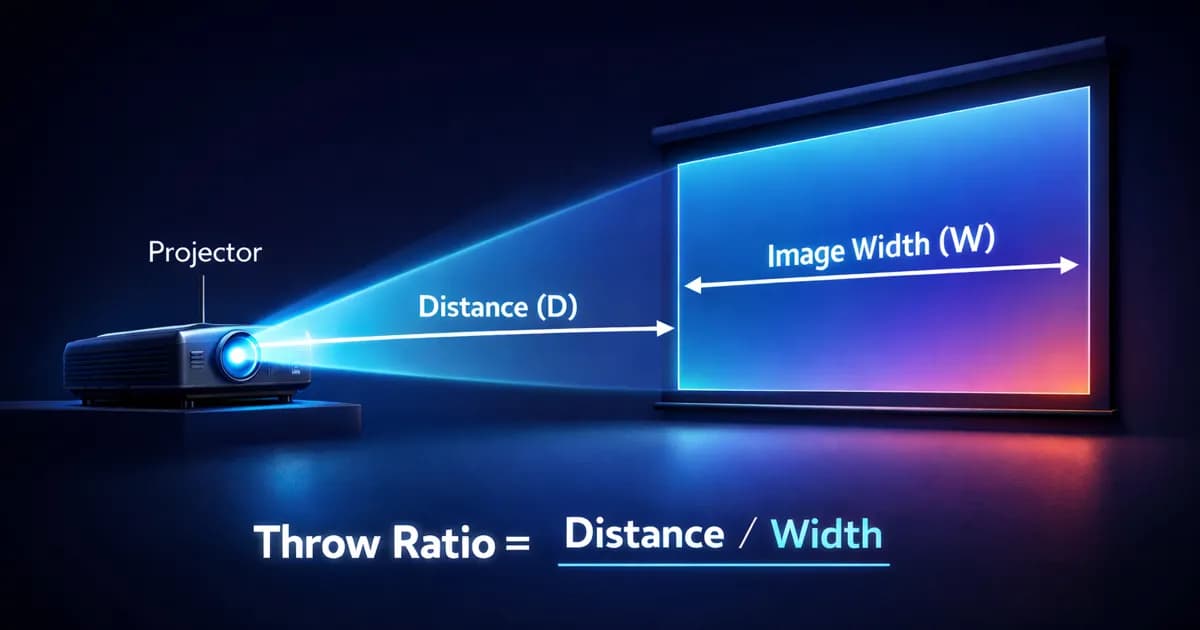
The throw ratio determines what image size you get at what distance. A projector with a single built-in lens locks you into one configuration. A projector with interchangeable optics adapts to any scenario.
The key parameters:
- Throw ratio: distance / image width ratio. The lower it is, the wider the angle of the lens
- Lens shift: ability to offset the image vertically and horizontally without distortion. Essential for architectural mapping
Field rule: For architectural mapping, require a projector with interchangeable optics and lens shift. The additional cost of the lens is negligible compared to the flexibility gained on site.
Need to calculate your throw ratio? The projection calculator determines the required optics based on your distance and surface size.
5. Connectivity and signal
Connectivity is rarely glamorous, but it's often where projects go off the rails.
HDMI: Standard, limited to 15m without a repeater. Sufficient for small installations.
HDBaseT: Video signal over network cable (Cat6), up to 100m. The standard for professional installations. Verify that your projector has it built in.
SDI: Broadcast standard, robust, long distances. Found on high-end projectors. Essential if you're working with broadcast teams.
NDI: Video signal over IP network. Increasingly common, very flexible for complex installations. But watch out for latency and network configuration.
My field advice: For any professional project, make sure you have at least HDBaseT. It's become the standard. If you only have HDMI, budget for extenders, and the problems that come with them.
6. Reliability and maintenance
In mapping, a projector that fails on show night is a nightmare.
Laser vs lamp:
- Laser: 20,000 to 30,000 hours of operation, no lamp replacement, gradual and uniform degradation. The current standard for professional installations
- Lamp: 2,000 to 5,000 hours, replacement necessary, faster degradation. Still found on entry-level models
For a permanent installation: laser is non-negotiable. The initial cost is higher, but the total cost of ownership (TCO) is lower over time.
For a one-off rental event: the light source technology matters less. Check the lamp hours if you're renting lamp-based equipment instead.
Which Projector for Which Use
One-off events
Context: Rental equipment, budget to optimize, maximum flexibility.
- Favor rental from specialized providers
- Choose widely available models (easier replacement in case of failure)
- Always plan for a spare projector (backup)
- The lumens-per-euro ratio is your main criterion
Permanent installations
Context: Daily operation, scheduled maintenance, long lifespan.
- Laser source mandatory (no lamp replacement)
- Check the availability of parts and technical support from the manufacturer
- Consider noise: in an enclosed space, a loud projector ruins the experience
- Calculate the TCO over 5 years, not just the purchase price
Outdoor monumental mapping
Context: High power, weather conditions, long distances.
- Minimum 20,000 lumens per projector (often 30,000+)
- Long throw lenses for large throw distances
- Protective enclosures (IP65 or custom) if exposed to weather
- Consider cooling: some models overheat in sealed enclosures
How many projectors for your facade? The multi-projector calculator determines the optimal configuration to cover your surface at the desired resolution.
Indoor immersive spaces
Context: Short throw, controlled noise, close-proximity image quality.
- Ultra short throw lens (throw ratio < 0.5)
- Noise < 35 dB, the audience is just a few meters away
- Heat: plan for room air conditioning (projectors generate heat, especially in quantity)
- High native resolution if the audience is very close to the surface
The Most Common Mistakes I See
Choosing based on lumens alone
The lumen count means nothing without context. 10,000 lumens on 4 sqm is blinding. 10,000 lumens on 200 sqm is invisible. And you still need to know which lumens they're talking about: peak, ANSI, center... Always think in lux on the surface, and ask for ANSI lumens.
Ignoring the nature of the projection surface
This is a mistake I see regularly: the power calculation is done for a theoretical white, flat wall. In the field, the surface is rarely ideal. A dark brick wall absorbs far more light than a light limestone facade. Architectural relief with moldings and recesses creates cast shadows that reduce perceived brightness. If you don't account for these parameters, your image will consistently be darker than expected.
Forgetting the lens in the budget
A professional projector with its lens can cost significantly more than the projector body alone. Too often, the lens is forgotten in the initial costing. And sometimes, the lens you need simply doesn't exist for the chosen model.
Overlooking noise in enclosed spaces
A 40,000-lumen projector is loud. Very loud. In an immersive space where the audience is 3 meters from the projector, it's a deal-breaker. Always check the noise level in dB before approving a model for an enclosed space.
Under-sizing to "save money"
This is the classic false economy. You go with a less powerful projector to save a few thousand euros. Result: the image is washed out, the client is disappointed, you have to compensate in post-production or rent a more powerful model on short notice. The additional cost far exceeds the initial savings.
My Sizing Method
Before choosing a projector, I systematically go through these steps:
- Define the surface: exact dimensions of the projection zone
- Calculate the required lux: based on the lighting environment and the nature of the surface (color, texture, relief)
- Determine the target pixel size: based on the audience distance
- Calculate the throw ratio: based on the available projection distance
- Verify connectivity: based on the source-to-projector distance and infrastructure
The projection calculator automates steps 2 through 4. The multi-projector calculator takes over for multi-projector configurations.
This is the method I use on every project, from the simplest to the most complex. It avoids unpleasant surprises and allows for precise costing.
Need support for your project?
Choosing the right projector is a technical decision that directly impacts the success of your project. If you have any doubt, it's better to get expert guidance than to fix things after the fact.
Let's talk about your project tovalidate your equipment choice.
Not ready to talk yet? Try our free calculation tools to size your installation.

Video mapping consultant and trainer
Fifteen years of monumental and museum-grade installations: Arc de Triomphe (7 editions), Museum of Art and Light Kansas (108 projectors), Atelier des Lumières. Design, multi-projector calibration, audit, Modulo Kinetic training.
Need technical expertise?
Let's discuss your video projection or mapping project. Reply within 48h business hours.
Discuss your projectDid you enjoy this article?
Receive my upcoming tips, field experience and best practices straight to your inbox.
By subscribing, you agree to receive our emails. You can unsubscribe at any time.
1 email per week maximum, unsubscribe in 1 click