Choosing a Projector Lens: The Complete Guide


Choosing a Projector Lens: The Complete Guide
In short. Choosing a projector lens means choosing a throw ratio compatible with the projector position and the target image size. Fixed lenses are the cheapest and offer the best image quality, but impose a precise distance (little margin at installation). Zoom lenses cover a throw ratio range (for example 1.2 to 1.8), providing flexibility at the cost of slight quality loss at the extremes and a higher price. Main categories: ultra-short throw (0.3 to 0.8, very short projection distance, ideal for scenography), short throw (0.8 to 1.3), standard throw (1.3 to 2), long throw (2 to 4), super long throw (above 4, for projections at long distance). Each manufacturer (Panasonic, Christie, Barco, NEC, Epson) offers its own range of lenses compatible with its models, to be verified before ordering the projector.
Introduction
The lens is the element that links your projector to your surface. It determines image size, edge quality, effective brightness, and largely the final result of your projection.
And yet, it is often the last thing people think about. You choose the projector (brand, power, resolution), validate the budget, and only when it is time to order do you realize you need to select a lens. Or worse: the lens you need does not exist in the chosen projector's range.
In 15 years of projects, I have seen installations compromised by a poor lens choice: image too small from the planned position, unacceptable edge distortion, inability to cover the surface. This kind of problem is discovered on site, when it is too late to change course.
This article provides the keys to choosing the right lens the first time, based on your setup, your projector, and your use case.
Fixed vs interchangeable lenses
Fixed lenses (built-in)
The projector ships with a non-removable lens. The throw ratio is fixed or has limited zoom. This is the case for most consumer projectors and some entry-level professional models.
Advantages:
- Lower price (no separate lens to purchase)
- Factory alignment guaranteed (no centering required)
- Simplicity (nothing to choose, nothing to mount)
Disadvantages:
- No flexibility: if the throw ratio does not suit you, you need to change projectors
- Only one possible use per projector
- If the lens is damaged, it often means replacing the entire projector
When it is appropriate: Simple, definitive installations where distance and image size are known and will not change. Small recurring events at the same location.
Interchangeable lenses (bayonet mount)
The projector accepts different lenses that mount and unmount in seconds (bayonet system). This is the standard on professional projectors (Barco, Panasonic, Christie, Epson Pro).
Advantages:
- One projector, multiple possible configurations
- The same fleet of projectors adapts to different projects
- Lens range from ultra short throw to very long throw
- Replace a damaged lens without touching the projector
Disadvantages:
- Significant additional cost per lens (varies widely depending on the range)
- Requires centering after mounting (on some models)
- Added weight and bulk from the lens on top of the projector
When it is essential: Any professional project, any rental company, any use case where the setup may vary from one project to another.
Field rule: Unless budget is extremely tight, always choose a projector with interchangeable lenses. On-site flexibility is priceless. On a project that goes sideways, being able to swap lenses in 2 minutes instead of swapping projectors is the difference between a solved problem and a disaster.
The 4 selection criteria
1. Available projection distance
This is the starting point. Before looking at lenses, measure the actual distance between the projector position and the projection surface.
Watch out for pitfalls:
- Measure the oblique distance if the projector is elevated (not the floor distance)
- Account for the thickness of support structures (truss, tower, lift) that push the projector back
- Outdoors, verify that the planned position is actually usable (accessibility, safety, clear line of sight)
2. Desired image size
The width of the image you want on the surface. In meters.
If the surface is 15m wide and you want to cover it with a single projector, the desired width is 15m. If you plan for 3 side-by-side projectors with overlap, each projector covers approximately 6m wide (including overlaps).
Tool: The multi-projector calculator automatically determines the width each projector needs to cover based on your configuration.
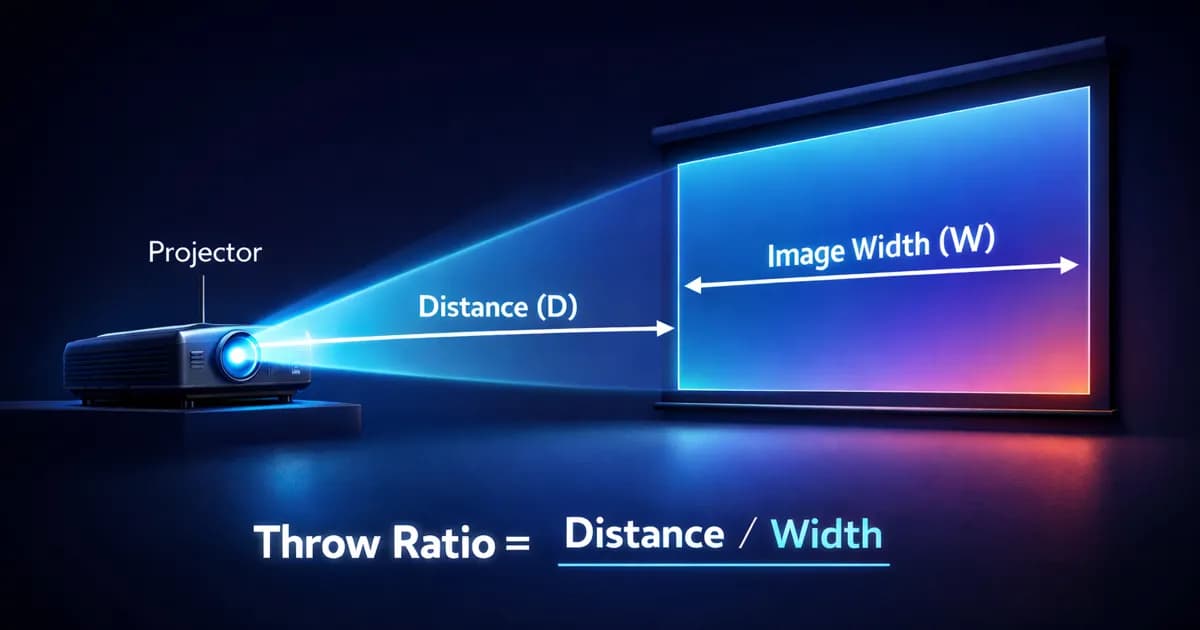
3. Resulting throw ratio
Once distance and width are known, the required throw ratio is straightforward:
TR = Distance / Width
This number determines the lens category.
| Throw ratio | Category |
|---|---|
| < 0.5 | Ultra short throw |
| 0.5 - 1.0 | Short throw |
| 1.0 - 2.0 | Standard |
| 2.0 - 5.0+ | Long throw |
Tip: Aim for the middle of the lens zoom range, not the extremes. If your calculation gives TR 1.5, a 1.2-1.8 lens is ideal. A 1.4-1.55 lens is too tight: the slightest distance variation on site will put you out of range.
Full article: Throw ratio: understanding, calculating and choosing the right lens
Calculate automatically: The projection calculator determines the required throw ratio from your measurements.
4. Compatibility with the projector
Each manufacturer has its own mount system. A Barco lens does not fit a Panasonic. And within the same manufacturer, product lines are not always cross-compatible.
Always verify:
- The exact mount reference (not just "Barco compatible")
- The list of compatible projectors in the lens spec sheet
- The lens weight (some UST lenses are very heavy and shift the center of gravity)
- Any lens shift restrictions with certain lenses
Lens ranges by manufacturer
Barco
Leader in the high-end professional market. Wide lens range for the UDX, UDM, G62 series, and older HDX/HDF models.
Typical ranges:
| Reference type | Throw ratio | Use |
|---|---|---|
| UST (Ultra Short Throw) | 0.28 - 0.38 | Immersive, rear projection |
| Short Throw | 0.75 - 0.95 | Constrained indoor |
| Standard Zoom | 1.22 - 1.53 | Versatile |
| Medium Throw | 1.52 - 2.92 | Standard events |
| Long Throw | 2.90 - 5.50 | Monumental, long distance |
Barco strengths: Exceptional optical quality, good lens shift range, excellent edge-to-edge uniformity. UDX/UDM lenses are cross-compatible, simplifying fleet management.
Panasonic
Very common in events and fixed installations. The PT-RQ/RZ (laser) series and older PT-DZ models often share the same mount system (ET-D type).
Typical ranges:
| Reference type | Throw ratio | Use |
|---|---|---|
| ET-DLE020 (UST) | 0.28 | Immersive |
| ET-DLE060 | 0.60 - 0.80 | Short throw |
| ET-DLE170 | 1.24 - 1.73 | Standard |
| ET-DLE350 | 2.37 - 3.58 | Long throw |
| ET-DLE450 | 3.58 - 5.38 | Very long throw |
Panasonic strengths: Excellent value for money, broad cross-generation compatibility (a single lens often works on 10+ projector models), good rental availability.
Christie
A reference in digital cinema and monumental mapping. The Griffyn, Crimson, and DHD/DWU series use a proprietary mount system.
Typical ranges:
| Reference type | Throw ratio | Use |
|---|---|---|
| Ultra Short Throw | 0.33 - 0.37 | Immersive, dome |
| Short Throw | 0.75 - 0.95 | Indoor |
| Standard | 1.20 - 1.50 | Events |
| Long Throw | 1.50 - 3.00 | Facade |
| Extra Long | 3.00 - 6.00+ | Monumental |
Christie strengths: Very good image quality at long throw (ideal for monumental), extended range for very long distances, proven reliability on large-scale projects.
Epson Pro
Accessible professional range. The EB-PU (laser) and EB-L series offer good value with interchangeable lenses.
Typical ranges:
| Reference type | Throw ratio | Use |
|---|---|---|
| ELPLU03S (UST) | 0.35 | Immersive |
| ELPLW06 | 0.77 - 0.87 | Short throw |
| ELPLU04 | 1.01 - 1.39 | Standard short |
| ELPLM15 | 1.44 - 2.32 | Standard long |
| ELPLL08 | 2.30 - 3.33 | Long throw |
Epson strengths: Very competitive pricing (most affordable interchangeable lens range on the market), good coverage of common needs, decent reliability. Ideal for controlled budgets and medium-sized installations.
Use cases by lens type
Ultra short throw (TR < 0.5): immersive and rear projection
Typical situations:
- Immersive spaces like Culturespaces (projectors on the ceiling, image on the floor and walls)
- Rear projection (projector behind a translucent screen)
- Shop windows, artistic installations in very tight spaces
- Dome projection (planetarium, immersive shows)
Points to watch:
- Distortion is at its maximum on image edges. Correction (warping) consumes resources and degrades effective resolution
- Positioning must be extremely precise: 1 cm of projector offset = several centimeters of shift on the image edges
- The hotspot (brighter area at center) is more pronounced than with other lens types
- Price is often high (among the most expensive lens types in any range)
Field example: On Culturespaces installations, UST lenses project large images from the ceiling without the projectors being visible to the audience. The trade-off is more demanding calibration.
Short throw (TR 0.5-1.0): indoor events
Typical situations:
- Medium-sized event venues (4-6m ceiling height)
- Mapping on stage sets
- Showrooms, exhibition halls
- Projection set back behind stage structures
Points to watch:
- Good overall image quality, moderate distortion
- Watch the lens shift: some short throw lenses have reduced lens shift
- Corner brightness can be 10-15% lower than center
Standard (TR 1.0-2.0): the versatile choice
Typical situations:
- Events of all sizes
- Facade mapping in urban settings
- Permanent installations with sufficient throw distance
- The vast majority of projects
Points to watch:
- Best light uniformity of all categories
- Minimal distortion
- Widest selection of available lenses (prices and references)
- Requires significant throw distance (plan the position in advance)
This is the category I recommend by default. If the setup allows it, a standard zoom lens offers the best quality/flexibility/price compromise.
Long throw (TR 2.0-5.0+): monumental and long distance
Typical situations:
- Monumental mapping (buildings, bridges, monuments)
- Projection from a tower or facing building
- Setups where the projector is very far from the surface (> 30m)
- Projection through a window or distant opening
Points to watch:
- Very sensitive to vibrations: the slightest projector movement is amplified proportionally to the distance. A rigid support structure is essential
- Outdoors, atmospheric turbulence (air layers at different temperatures) can make the image "shimmer" at long distances
- The narrow beam concentrates light, which is advantageous in terms of lux, but more projectors are needed to cover a wide surface
Field example: On the Museum of Art + Light project, 108 projectors cover the entire space. The lens selection (short throw for nearby walls, standard for intermediate surfaces, long throw for distant surfaces) was decisive in achieving uniform coverage.
Common mistakes
1. Ordering the lens last
This is the classic mistake. The projector is chosen, the budget validated, and the lens is treated as an accessory. Result: a late discovery that the right lens costs significantly more than expected, or that it is not available within the required timeline.
Solution: Integrate the lens choice and cost from the sizing phase. The projector and lens are an inseparable pair.
2. Choosing too narrow a zoom range
"My calculation gives TR 1.48, I will take the 1.40-1.55 lens." On paper, it works. On site, the projector is 80cm further back than planned (support thickness, access constraints) and you are out of range.
Solution: Aim for a zoom range that places your calculated TR in the middle, not at the edges. Keep 20-30% margin on each side.
3. Forgetting UST lens weight
Some ultra short throw lenses weigh 5 to 10 kg and shift the projector's center of gravity. If the projector is suspended (hung from the ceiling), the structure must support the total weight and the mounting must be reassessed.
4. Neglecting optical quality at zoom extremes
All zoom lenses have an "optimal" range (generally around the middle of the zoom) and degraded performance at the extremes. At the zoom limits, you often see loss of sharpness on the edges, vignetting, and more pronounced chromatic aberration.
Solution: Use the middle of the zoom range whenever possible. If you must use an extreme, check edge quality before committing.
5. Not checking available lens shift with the chosen lens
On some projectors, the available lens shift varies depending on the mounted lens. A UST lens can limit vertical lens shift to +/- 10% instead of the +/- 60% available with a standard lens.
Solution: Consult the lens shift/lens compatibility matrix in the projector documentation. It is rarely in the lens spec sheet itself, but in the projector manual.
FAQ
Can you mount a lens from one brand on a projector from another brand?
No. Each manufacturer uses a proprietary mount system. There is no universal standard. Barco, Panasonic, Christie, and Epson mounts are all incompatible with each other. A few third-party adapters exist, but using them is risky (imprecise centering, warranty voided).
How much does a replacement lens cost?
Prices vary considerably depending on the manufacturer, projector range, and lens type. A standard zoom lens costs less than a short throw or long throw, and UST lenses are the most expensive in the catalog. The budget can range from a few thousand euros to several thousand depending on the configuration. Request a quote from your dealer for precise pricing.
Can you use a fixed lens on a professional project?
Yes, if the setup is perfectly known and stable. On a permanent installation where distance and surface will never change, a quality fixed lens will deliver a perfect result at a lower price. But on event projects where each venue is different, a zoom lens is essential.
How do I know if a lens is compatible with my projector?
Each manufacturer publishes a lens/projector compatibility matrix in their documentation. The most reliable method is to check the manufacturer's website, on the projector product page (under "compatible lenses") or the lens page (under "compatible projectors"). When in doubt, contact the distributor.
Should you buy a used lens?
It is possible, but with precautions. Check for scratches on the lens elements, proper zoom and focus operation, and the condition of electrical contacts (on motorized lenses). A quality lens ages well if it has been properly stored and handled. The main risk is the absence of manufacturer warranty.
Need help choosing the right lens?
Lens choice determines the entire projection chain. Getting it wrong at this stage means rethinking projector positions, the number of units, and potentially the budget.
Let's talk about your project to validate your lens choice and technical setup.
Calculate it yourself with our free tools:
- Projection calculator: throw ratio, distance, image size
- Multi-projector calculator: optimal multi-projector configuration
- 3D Simulator Lumeo: visualize your projectors and their lenses in 3D
To go further: Throw ratio: understanding, calculating and choosing the right lens to master sizing calculations.

Video mapping consultant and trainer
Fifteen years of monumental and museum-grade installations: Arc de Triomphe (7 editions), Museum of Art and Light Kansas (108 projectors), Atelier des Lumières. Design, multi-projector calibration, audit, Modulo Kinetic training.
Need technical expertise?
Let's discuss your video projection or mapping project. Reply within 48h business hours.
Discuss your projectDid you enjoy this article?
Receive my upcoming tips, field experience and best practices straight to your inbox.
By subscribing, you agree to receive our emails. You can unsubscribe at any time.
1 email per week maximum, unsubscribe in 1 click