Projection Calculator: Complete User Guide

Projection Calculator: Complete User Guide
In short. The projection calculator addresses three use cases through three dedicated tabs. "I have a projector": from a projector model and a distance, the tool computes the projected image size, the required throw ratio, the projected pixel size, and the estimated lux on the surface. "I have a surface": from the target surface dimensions and desired illuminance, the tool returns the minimum lumens required and the lens to choose given the projector position. "I am looking for a projector": the tool crosses the project constraints (image size, distance, target lux) and proposes the minimum technical specs to shortlist compatible models. The formulas used are documented in the article and include typical optical losses (angle of incidence, reflectance, source aging) to deliver a result usable in pre-sales.
Introduction
How many times have I seen teams waste time with manual calculations? Throw ratio, projected pixel size, lux/lumens conversion... These calculations are necessary, but tedious.
Worse: one miscalculation during the preparation phase, and the entire project goes off track. Wrong lens ordered, underpowered projector, or conversely an oversized unit with a blown budget for nothing.
The projection calculator I developed addresses this simple need: getting the right answers quickly, with no risk of error.
What is this tool for?
The projection calculator covers three main use cases, corresponding to the three tabs in the interface.
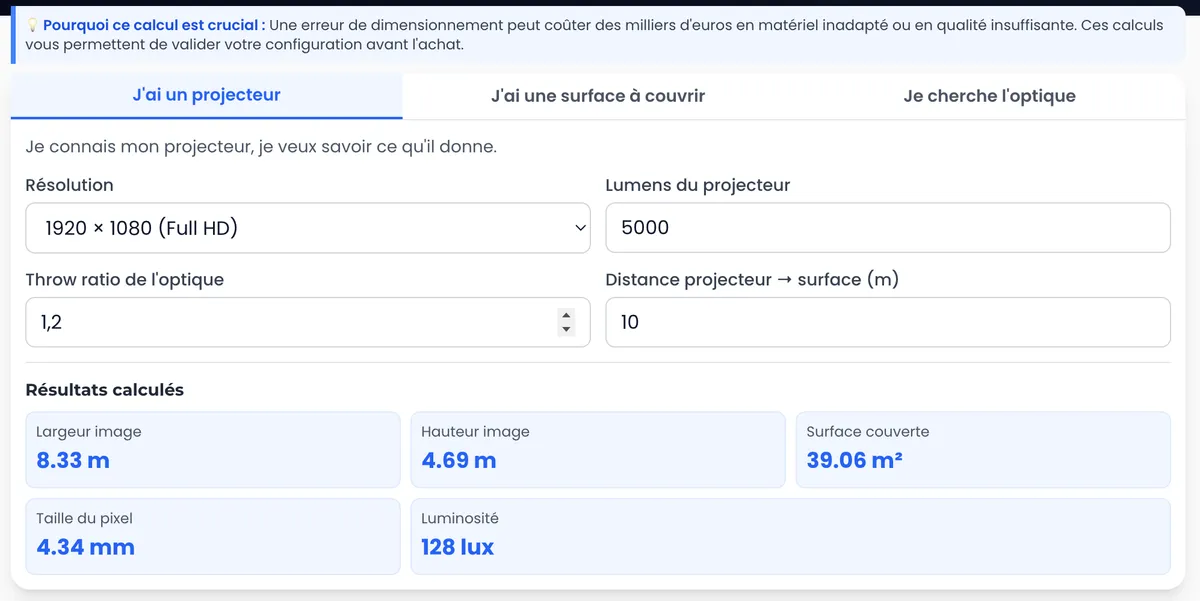
Tab 1: "I have a projector"
Typical situation: You have a projector (or you're comparing several models), and you want to know what you can do with it.
What the calculator does:
- Calculates the projected image size based on distance and throw ratio
- Determines the projected pixel size (crucial for resolution planning)
- Converts lumens to lux (actual light intensity on the surface)
Real-world example: You have a 10,000-lumen projector with a 0.8-1.0 lens. You want to project at 10 meters. The calculator instantly tells you: 12.5m wide image, 6.5mm pixel, approximately 100 lux on the surface.
Tab 2: "I have a surface"
Typical situation: You know the surface to cover and the desired resolution. You want to know which projectors and lens to choose.
What the calculator does:
- Determines the required throw ratio based on available distance
- Calculates the lumens needed to reach the target light intensity (in lux)
- Gives the corresponding projected pixel size
Real-world example: You need to cover a 20m wide wall, at 15m distance, with at least 80 lux. The calculator tells you that you need a 0.75 throw ratio, approximately 25,000 lumens, and gives you the expected pixel size.
Tab 3: "I'm looking for a lens"
Typical situation: You already have the projector, you know the surface to cover and the distance. You need to find which lens to order.
What the calculator does:
- Precisely calculates the required throw ratio
- Helps you choose the lens compatible with your projector
Real-world example: 18m surface, 12m distance. The calculator indicates a throw ratio of 0.67. You now know which lens to order (e.g. 0.6-0.8 if available).
How to use it effectively
Check your units
The calculator accepts meters and millimeters. Make sure you stay consistent with your inputs. A unit error is an error by a factor of 1,000.
Understand the throw ratio
The throw ratio is the ratio between the projection distance and the width of the projected image.
Throw ratio = Distance / Image width
- Throw ratio < 1: wide-angle lens (ultra short throw)
- Throw ratio between 1 and 2: standard lens
- Throw ratio > 2: telephoto (long throw)
The lower the throw ratio, the larger the image you can project from a short distance.
Calculate the projected pixel size
This is the most important piece of information for determining your production resolution.
Why it matters: If your projected pixel is 5mm, there's no point producing content with a 2mm image pixel. You're wasting resolution (and render time) for nothing.
The calculator does this automatically as soon as you enter the projector's native resolution.
Use lux, not lumens
Lumens measure the total light output of the projector. Lux measures the actual light intensity on the surface.
What matters is lux.
For an outdoor nighttime projection with low light pollution: aim for at least 60-80 lux. In brighter environments, go up to 100-150 lux or more.
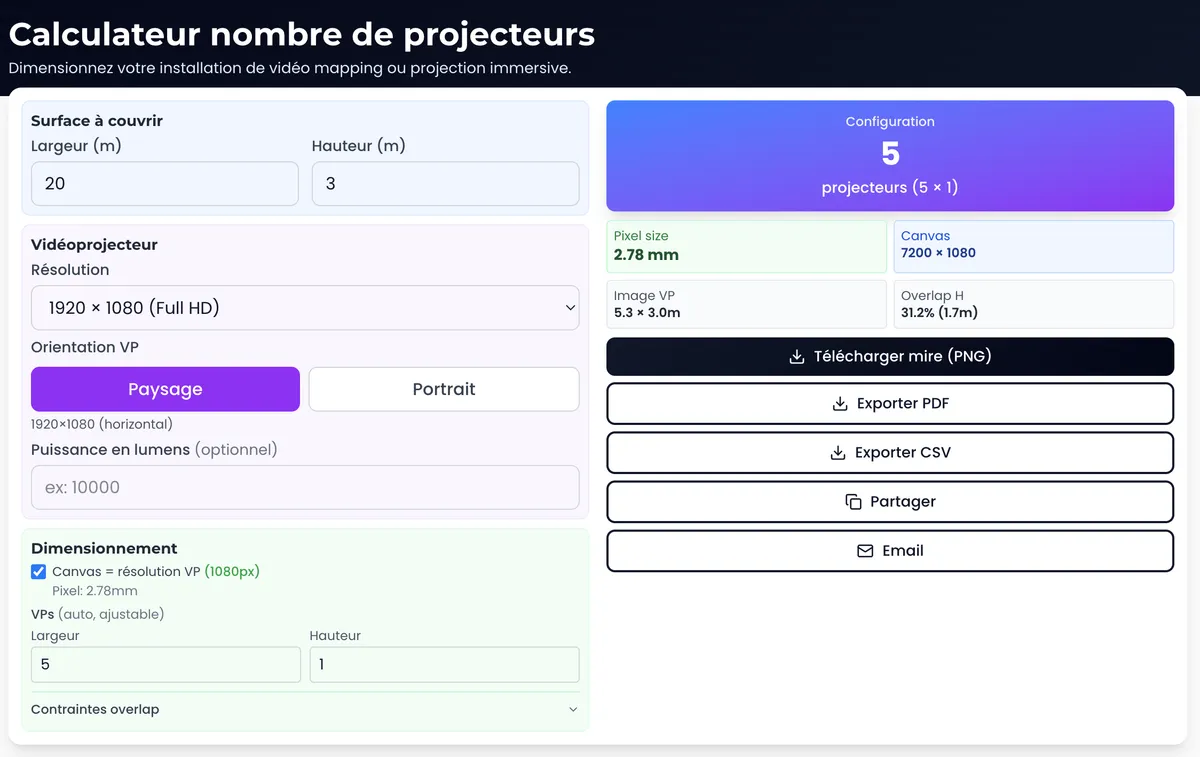
To go further and calculate how many projectors you need to cover a large surface, use the multi-projector calculator.
Real-world use cases
Comparing multiple projectors
You're deciding between two models for a project. Enter the specs of each in Tab 1. Compare the results (lux, pixel size, coverage). You'll have your answer in 2 minutes.
Sizing a project during the study phase
Pre-sales phase: you need to quote a project. The client has a 30m wide facade. You test different configurations (1 large projector vs several medium ones, possible distances, available lenses). The calculator gives you all the answers.
Verifying a received quote
You receive a quote with proposed projectors. You verify in the calculator whether it holds up: are the lux sufficient? Is the pixel size consistent with the stated resolution?
Conclusion
The projection calculator is the tool I wish I'd had when I started out. No more calculation errors, no more guesswork.
It doesn't replace experience or judgment, but it speeds up the work and secures decisions.
Free, no sign-up required, available directly on the site. Use it as often as you need.
Need support for your project?
Let's talk about your project to discuss your projection or mapping project.
Ready to size your installation? Use the multi-projector calculator to determine how many projectors you need.
Download the free guide: 10 mistakes that ruin your mapping project (and how to avoid them).

Video mapping consultant and trainer
Fifteen years of monumental and museum-grade installations: Arc de Triomphe (7 editions), Museum of Art and Light Kansas (108 projectors), Atelier des Lumières. Design, multi-projector calibration, audit, Modulo Kinetic training.
Need technical expertise?
Let's discuss your video projection or mapping project. Reply within 48h business hours.
Discuss your projectDid you enjoy this article?
Receive my upcoming tips, field experience and best practices straight to your inbox.
By subscribing, you agree to receive our emails. You can unsubscribe at any time.
1 email per week maximum, unsubscribe in 1 click